Learn from the best! Meet the four finalists headed to the FINALS of the Power BI Dataviz World Championships! Register now
I have a parameter I am trying to create in order to determine the revenue associated with a dynamic number of customers. This formula gives me all of the revenue rather than limiting it to the number of customers selected by the parameter. How would I fix this?
Top N =
Calculate(sum([Rev]),
TopN(Parameter Value, VALUES([Customer Rank]), sum([Rev]), ASC)
)
Hi @czuniga ,
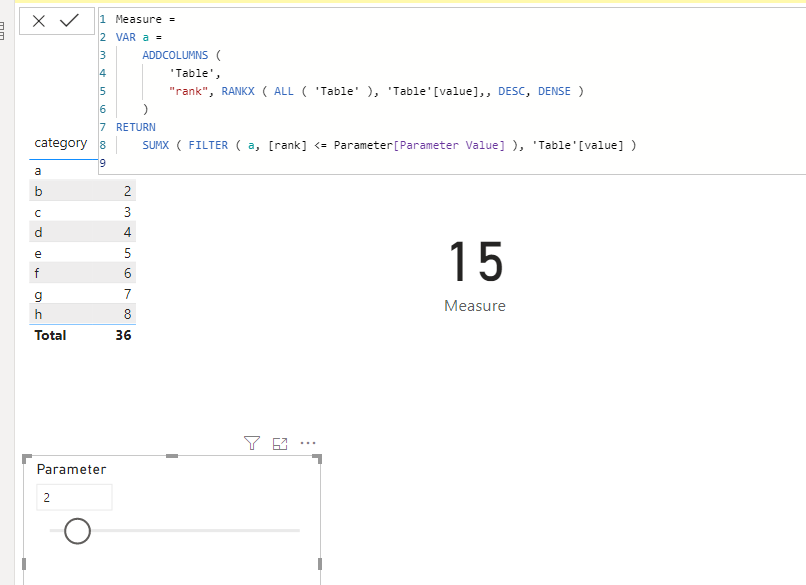
We can create a measure as below to work on it.
Measure =
VAR a =
ADDCOLUMNS (
'Table',
"rank", RANKX ( ALL ( 'Table' ), 'Table'[value],, DESC, DENSE )
)
RETURN
SUMX ( FILTER ( a, [rank] <= Parameter[Parameter Value] ), 'Table'[value] )
Pbix as attached.
Hi @czuniga ,
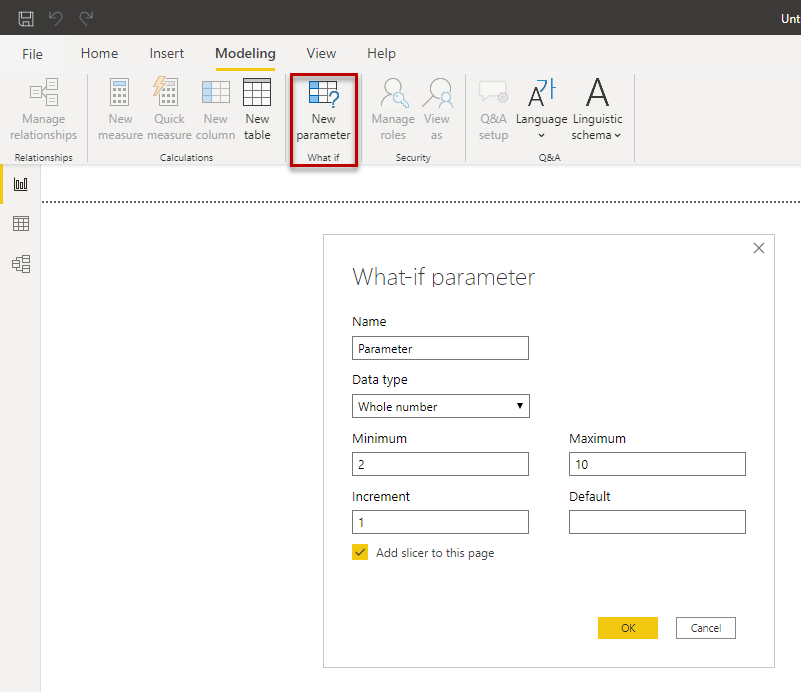
use the what-if parameter, see figure. It creates a new table with a measure. Insert this measure in your TopN measure.
Regards FrankAT
A new Power BI DataViz World Championship is coming this June! Don't miss out on submitting your entry.
Share feedback directly with Fabric product managers, participate in targeted research studies and influence the Fabric roadmap.
| User | Count |
|---|---|
| 47 | |
| 35 | |
| 28 | |
| 17 | |
| 16 |
| User | Count |
|---|---|
| 59 | |
| 57 | |
| 40 | |
| 22 | |
| 20 |