This is best Fabric, Power BI, SQL and AI community event. How do we know? The last event sold out! Save €200 with code FABCMTY200.
Register nowA new Data Days event is coming soon! This time we’re going bigger than ever. Fabric, Power BI, SQL, AI and more. Don't miss out.
I have a parameter I am trying to create in order to determine the revenue associated with a dynamic number of customers. This formula gives me all of the revenue rather than limiting it to the number of customers selected by the parameter. How would I fix this?
Top N =
Calculate(sum([Rev]),
TopN(Parameter Value, VALUES([Customer Rank]), sum([Rev]), ASC)
)
Hi @czuniga ,
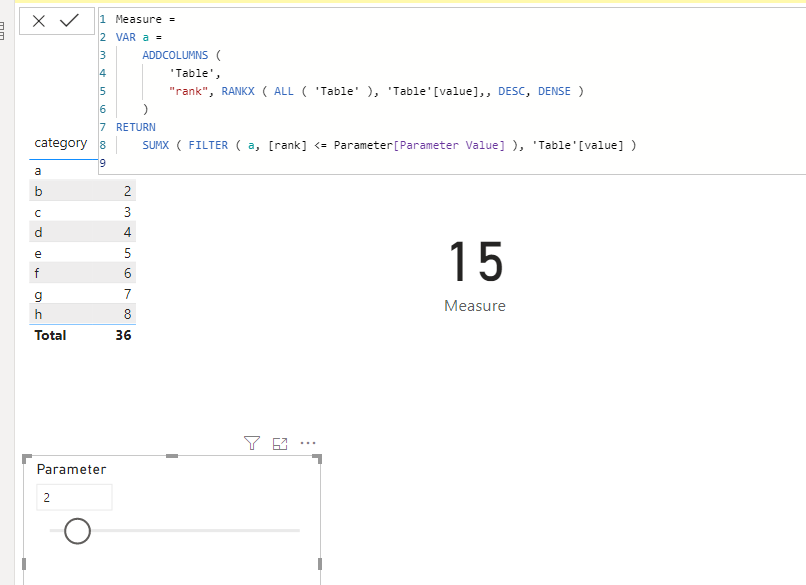
We can create a measure as below to work on it.
Measure =
VAR a =
ADDCOLUMNS (
'Table',
"rank", RANKX ( ALL ( 'Table' ), 'Table'[value],, DESC, DENSE )
)
RETURN
SUMX ( FILTER ( a, [rank] <= Parameter[Parameter Value] ), 'Table'[value] )
Pbix as attached.
Hi @czuniga ,
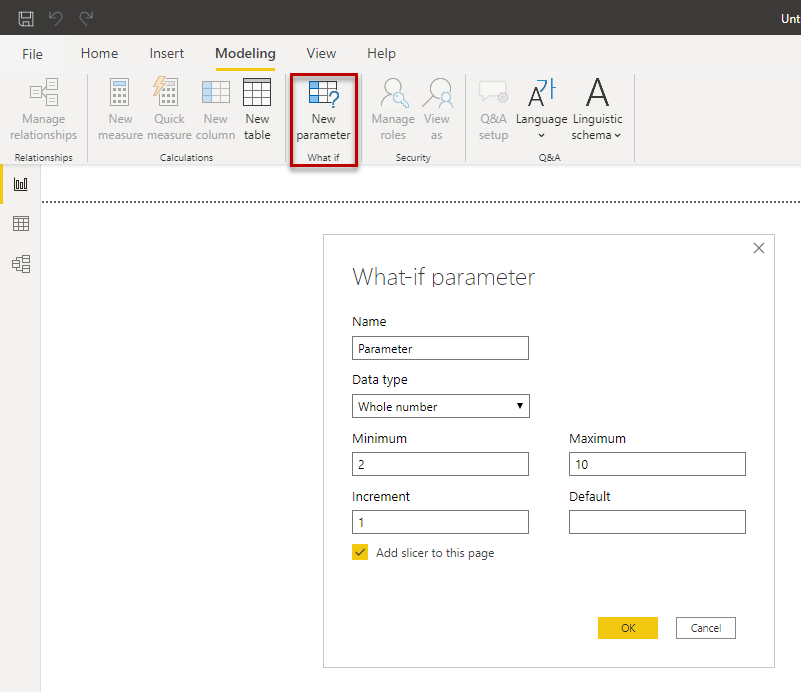
use the what-if parameter, see figure. It creates a new table with a measure. Insert this measure in your TopN measure.
Regards FrankAT
Check out the May 2026 Power BI update to learn about new features.
Sign up to receive a private message when registration opens and key events begin.
If you have recently started exploring Fabric, we'd love to hear how it's going. Your feedback can help with product improvements.
| User | Count |
|---|---|
| 27 | |
| 25 | |
| 25 | |
| 21 | |
| 14 |
| User | Count |
|---|---|
| 52 | |
| 46 | |
| 23 | |
| 18 | |
| 18 |