Don't miss your chance to take the Fabric Data Engineer (DP-600) exam for FREE! Find out how by attending the DP-600 session on April 23rd (pacific time), live or on-demand.
Learn moreJoin the FabCon + SQLCon recap series. Up next: Power BI, Real-Time Intelligence, IQ and AI, and Data Factory take center stage. All sessions are available on-demand after the live show. Register now
Hello,
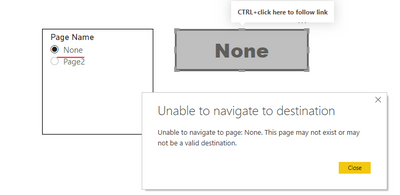
I have created a page navigation button with conditional formatting for the target page. The target page is set to "None" when the button should be disabled.
I have set the text for the disabled state (under button text) but it is not triggered. When doing the same using a drillthrough button, the disabled state of the button is triggered when the target is set to "None", but not when the action type on the button is page navigation.
Try clicking on the entries in the table in Page 1 and notice the effect on the buttons on the right.
Kindly inform how to set the button state to disabled when using page navigation as the action type for the button.
Solved! Go to Solution.
Thanks @v-lionel-msft
This workaround works!
1. Use conditional formatting to change the button color and text to simulate a disabled state
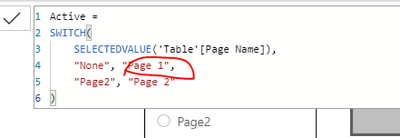
2. In the page navigation conditional formatting, set the button to navigate to the same page name it is displayed on.
Still, the disabled state of the button itself is not triggered when the action is of type page navigation instead of drill through so I hope you would submit that as a bug to the product team.
Best regards,
Youssef
Dear @v-lionel-msft
This does not solve my issue. I would like to make the button disabled and make the button not clickable instead of users clicking the button and showing an error message.
If you check the drillthrough button in my sample, you will find the desired behaviour.
I tried to change the button text for the disabled state in your sample, but that text is never displayed on the button.
Hi @Anonymous ,
"This does not solve my issue. I would like to make the button disabled and make the button not clickable instead of users clicking the button and showing an error message."
You just need to modify the [Active] measure.
There is no feedback when you click the gray button.
Best regards,
Lionel Chen
If this post helps, then please consider Accept it as the solution to help the other members find it more quickly.
Thanks @v-lionel-msft
This workaround works!
1. Use conditional formatting to change the button color and text to simulate a disabled state
2. In the page navigation conditional formatting, set the button to navigate to the same page name it is displayed on.
Still, the disabled state of the button itself is not triggered when the action is of type page navigation instead of drill through so I hope you would submit that as a bug to the product team.
Best regards,
Youssef
Check out the April 2026 Power BI update to learn about new features.
If you have recently started exploring Fabric, we'd love to hear how it's going. Your feedback can help with product improvements.
A new Power BI DataViz World Championship is coming this June! Don't miss out on submitting your entry.
| User | Count |
|---|---|
| 48 | |
| 40 | |
| 38 | |
| 20 | |
| 16 |
| User | Count |
|---|---|
| 68 | |
| 67 | |
| 30 | |
| 26 | |
| 26 |