This is best Fabric, Power BI, SQL and AI community event. How do we know? The last event sold out! Save €200 with code FABCMTY200.
Register nowThe Fabric community is upgrading! Read all of the details including the timeline and what you can expect. Learn more
Hi, Can you please help me with DAX formulas, I kinda stuck.
I have START Date and END Date and need to calculate Days Between, I used this function below to create new column:
Solved! Go to Solution.
Hi @Anonymous,
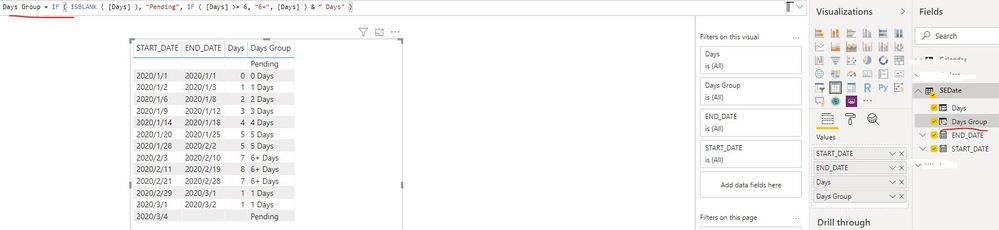
Please try to create one calculated column as below:
Days Group = IF ( ISBLANK ( [Days] ), "Pending", IF ( [Days] >= 6, "6+", [Days] ) & " Days" )If the above formula is not applicable in your scenario, could you please explain which condition can be grouped as " Pending "?
Best Regards
Rena
Thank you, everyone, for the help!
Hi @Anonymous,
Please try to create one calculated column as below:
Days Group = IF ( ISBLANK ( [Days] ), "Pending", IF ( [Days] >= 6, "6+", [Days] ) & " Days" )If the above formula is not applicable in your scenario, could you please explain which condition can be grouped as " Pending "?
Best Regards
Rena
Hi @Anonymous
try to use grouping technique as described here https://docs.microsoft.com/en-us/power-bi/desktop-grouping-and-binning
Hello @Anonymous
I would recommend to use Power Query for this:
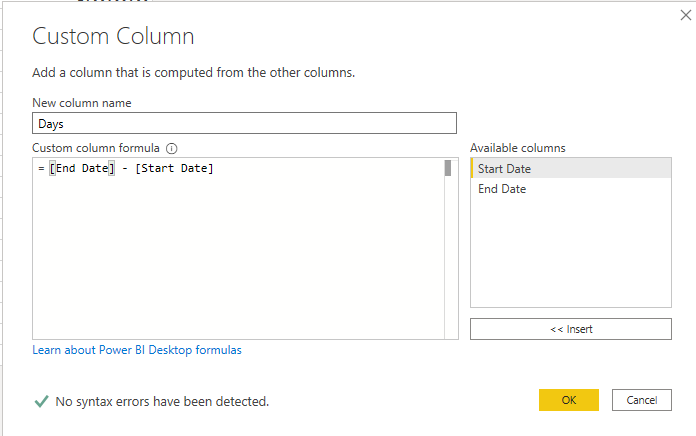
Add a custom column:
Change the column type to number:
Add a conditional column:
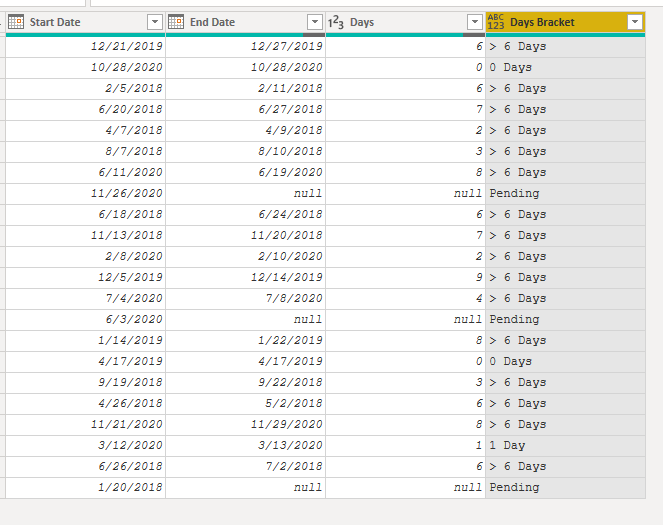
Result:
Cheers!
Vivek
If it helps, please mark it as a solution
Kudos would be a cherry on the top 🙂
https://www.vivran.in/
Connect on LinkedIn
Join us in Barcelona for FabCon and SQLCon, the Fabric, Power BI, SQL, and AI community event. Save €200 with code FABCMTY200.
| User | Count |
|---|---|
| 24 | |
| 22 | |
| 20 | |
| 18 | |
| 14 |
| User | Count |
|---|---|
| 25 | |
| 20 | |
| 20 | |
| 20 | |
| 20 |