Join us at FabCon Atlanta from March 16 - 20, 2026, for the ultimate Fabric, Power BI, AI and SQL community-led event. Save $200 with code FABCOMM.
Register now!Get Fabric Certified for FREE during Fabric Data Days. Don't miss your chance! Request now
Hello,
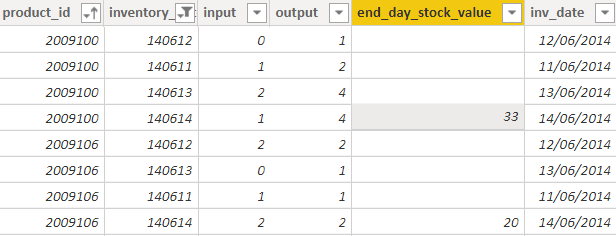
I get the following table with products and stocks
I get the stock value only for my last date (2014-06-14) for each product and I want to get it for all previous days ...
For example : my stock value for product 2009100 and date 2014-06-13 will be 33 (stock at 2016-06-14) + 4 (outputs at 2016-06-14) - 1 (input at 2016-06-14) = 36
Is there a way to do this iterative calculation ? Start from the last date for each product and complete the table ?
Thanks for your help ...
Solved! Go to Solution.
I was going to tell you that you can use a calculated column BUT there is no way to tell powerbi to to run calculations in a certain order (or recursive). So the formula would be fairly complex because you have to do (in your calculated column)
- look for the maximum date available for this inventory id
- determine the stock amount
- iterate through all of the rows from that max date to current date, summing all in, out
so something along the lines of
calcStock=
VAR thisProduct = table[product_id]
VAR thisDate = table[inv_date]
VAR maxDate=MAXX(FILTER(table;table[product_id] = thisProduct);table[inv_date])
VAR endStock=MAXX(FILTER(table);table[product_id]=thisProduct && table[inv_date]=maxDate); table[end_day_stock_value])
VAR differential= SUMX(FILTER(Table;table[product_id]=thisProduct && table[inv_date]>=thisDate);table[output]-table[input])
RETURN
endStock+differential
(I haven't tested but SHOULD work)
Hi @jsteffe
The dax which is written by @Anonymous is correct.
One change needs to be done in it for differential
Hi @jsteffe
The dax which is written by @Anonymous is correct.
One change needs to be done in it for differential
Thanks a lot for your precise answer : it perfectly works !
I was going to tell you that you can use a calculated column BUT there is no way to tell powerbi to to run calculations in a certain order (or recursive). So the formula would be fairly complex because you have to do (in your calculated column)
- look for the maximum date available for this inventory id
- determine the stock amount
- iterate through all of the rows from that max date to current date, summing all in, out
so something along the lines of
calcStock=
VAR thisProduct = table[product_id]
VAR thisDate = table[inv_date]
VAR maxDate=MAXX(FILTER(table;table[product_id] = thisProduct);table[inv_date])
VAR endStock=MAXX(FILTER(table);table[product_id]=thisProduct && table[inv_date]=maxDate); table[end_day_stock_value])
VAR differential= SUMX(FILTER(Table;table[product_id]=thisProduct && table[inv_date]>=thisDate);table[output]-table[input])
RETURN
endStock+differential
(I haven't tested but SHOULD work)
Hi @Anonymous thanks for the fix!
Check out the November 2025 Power BI update to learn about new features.
Advance your Data & AI career with 50 days of live learning, contests, hands-on challenges, study groups & certifications and more!