This time we’re going bigger than ever. Fabric, Power BI, SQL, AI and more. We're covering it all. You won't want to miss it.
Learn moreLevel up your Power BI skills this month - build one visual each week and tell better stories with data! Get started
Hello,
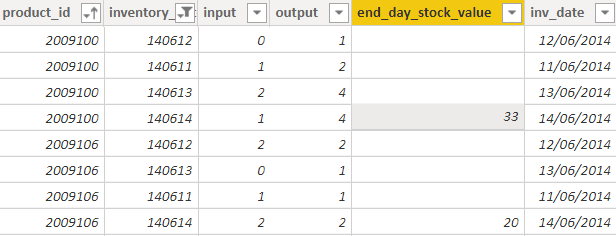
I get the following table with products and stocks
I get the stock value only for my last date (2014-06-14) for each product and I want to get it for all previous days ...
For example : my stock value for product 2009100 and date 2014-06-13 will be 33 (stock at 2016-06-14) + 4 (outputs at 2016-06-14) - 1 (input at 2016-06-14) = 36
Is there a way to do this iterative calculation ? Start from the last date for each product and complete the table ?
Thanks for your help ...
Solved! Go to Solution.
I was going to tell you that you can use a calculated column BUT there is no way to tell powerbi to to run calculations in a certain order (or recursive). So the formula would be fairly complex because you have to do (in your calculated column)
- look for the maximum date available for this inventory id
- determine the stock amount
- iterate through all of the rows from that max date to current date, summing all in, out
so something along the lines of
calcStock=
VAR thisProduct = table[product_id]
VAR thisDate = table[inv_date]
VAR maxDate=MAXX(FILTER(table;table[product_id] = thisProduct);table[inv_date])
VAR endStock=MAXX(FILTER(table);table[product_id]=thisProduct && table[inv_date]=maxDate); table[end_day_stock_value])
VAR differential= SUMX(FILTER(Table;table[product_id]=thisProduct && table[inv_date]>=thisDate);table[output]-table[input])
RETURN
endStock+differential
(I haven't tested but SHOULD work)
Hi @jsteffe
The dax which is written by @Anonymous is correct.
One change needs to be done in it for differential
Hi @jsteffe
The dax which is written by @Anonymous is correct.
One change needs to be done in it for differential
Thanks a lot for your precise answer : it perfectly works !
I was going to tell you that you can use a calculated column BUT there is no way to tell powerbi to to run calculations in a certain order (or recursive). So the formula would be fairly complex because you have to do (in your calculated column)
- look for the maximum date available for this inventory id
- determine the stock amount
- iterate through all of the rows from that max date to current date, summing all in, out
so something along the lines of
calcStock=
VAR thisProduct = table[product_id]
VAR thisDate = table[inv_date]
VAR maxDate=MAXX(FILTER(table;table[product_id] = thisProduct);table[inv_date])
VAR endStock=MAXX(FILTER(table);table[product_id]=thisProduct && table[inv_date]=maxDate); table[end_day_stock_value])
VAR differential= SUMX(FILTER(Table;table[product_id]=thisProduct && table[inv_date]>=thisDate);table[output]-table[input])
RETURN
endStock+differential
(I haven't tested but SHOULD work)
Hi @Anonymous thanks for the fix!
Check out the April 2026 Power BI update to learn about new features.
Sign up to receive a private message when registration opens and key events begin.
If you have recently started exploring Fabric, we'd love to hear how it's going. Your feedback can help with product improvements.
| User | Count |
|---|---|
| 36 | |
| 32 | |
| 26 | |
| 24 | |
| 17 |
| User | Count |
|---|---|
| 70 | |
| 50 | |
| 31 | |
| 26 | |
| 22 |