We've captured the moments from FabCon & SQLCon that everyone is talking about, and we are bringing them to the community, live and on-demand. Starts on April 14th. Register now
Hi, Can you please help me with DAX formulas, I kinda stuck.
I have START Date and END Date and need to calculate Days Between, I used this function below to create new column:
Solved! Go to Solution.
Hi @Anonymous,
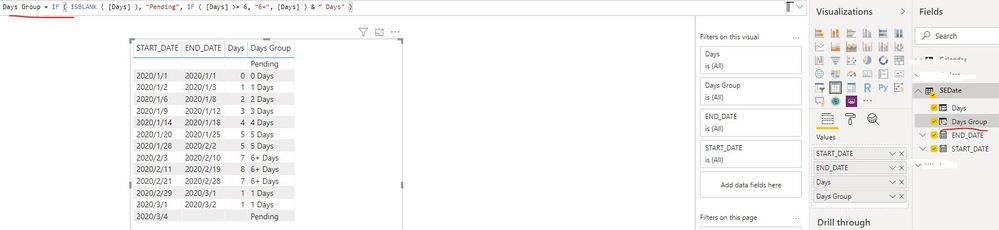
Please try to create one calculated column as below:
Days Group = IF ( ISBLANK ( [Days] ), "Pending", IF ( [Days] >= 6, "6+", [Days] ) & " Days" )If the above formula is not applicable in your scenario, could you please explain which condition can be grouped as " Pending "?
Best Regards
Rena
Thank you, everyone, for the help!
Hi @Anonymous,
Please try to create one calculated column as below:
Days Group = IF ( ISBLANK ( [Days] ), "Pending", IF ( [Days] >= 6, "6+", [Days] ) & " Days" )If the above formula is not applicable in your scenario, could you please explain which condition can be grouped as " Pending "?
Best Regards
Rena
Hi @Anonymous
try to use grouping technique as described here https://docs.microsoft.com/en-us/power-bi/desktop-grouping-and-binning
Hello @Anonymous
I would recommend to use Power Query for this:
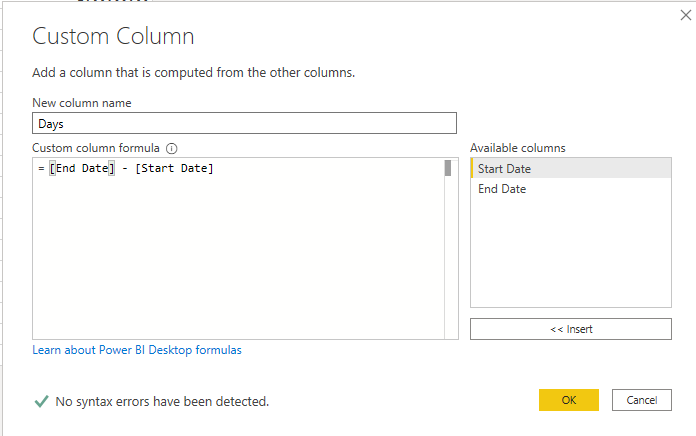
Add a custom column:
Change the column type to number:
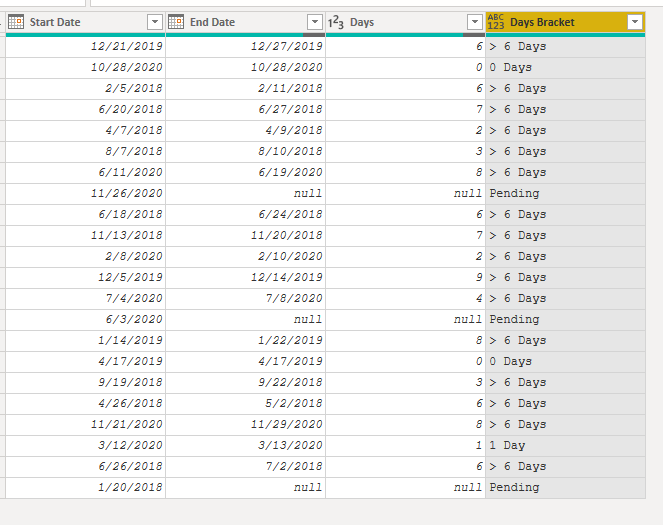
Add a conditional column:
Result:
Cheers!
Vivek
If it helps, please mark it as a solution
Kudos would be a cherry on the top 🙂
https://www.vivran.in/
Connect on LinkedIn
If you have recently started exploring Fabric, we'd love to hear how it's going. Your feedback can help with product improvements.
A new Power BI DataViz World Championship is coming this June! Don't miss out on submitting your entry.
| User | Count |
|---|---|
| 56 | |
| 40 | |
| 36 | |
| 18 | |
| 18 |
| User | Count |
|---|---|
| 70 | |
| 67 | |
| 38 | |
| 34 | |
| 23 |