Don't miss your chance to take the Fabric Data Engineer (DP-600) exam for FREE! Find out how by attending the DP-600 session on April 23rd (pacific time), live or on-demand.
Learn moreNext up in the FabCon + SQLCon recap series: The roadmap for Microsoft SQL and Maximizing Developer experiences in Fabric. All sessions are available on-demand after the live show. Register now
How to change the format from 2020-02-11T08:45:58.6470000 to 2020-02-11 in power bi, it returns wrong date and month if i'm using the format function
Solved! Go to Solution.
Hi @Anonymous ,
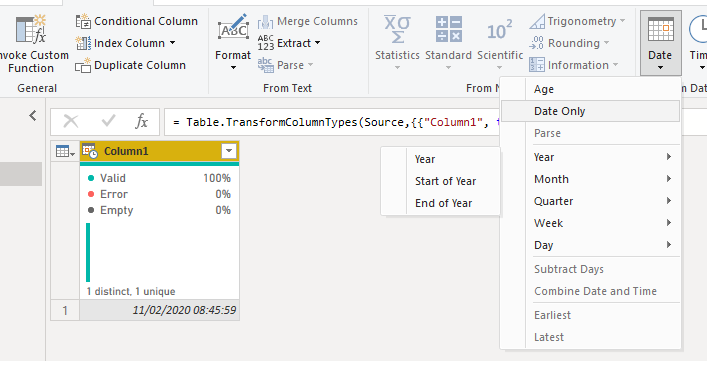
On the query editor be sure that you have the format of the columns as Date/Time then go to add column and select the Date Only, this will give you a new column with only the date part should work as expected.
then delete the initial column
Regards
Miguel Félix
Proud to be a Super User!
Check out my blog: Power BI em PortuguêsHi @Anonymous ,
On the query editor be sure that you have the format of the columns as Date/Time then go to add column and select the Date Only, this will give you a new column with only the date part should work as expected.
then delete the initial column
Regards
Miguel Félix
Proud to be a Super User!
Check out my blog: Power BI em PortuguêsThank you
If you have recently started exploring Fabric, we'd love to hear how it's going. Your feedback can help with product improvements.
A new Power BI DataViz World Championship is coming this June! Don't miss out on submitting your entry.
Experience the highlights from FabCon & SQLCon, available live and on-demand starting April 14th.
| User | Count |
|---|---|
| 48 | |
| 46 | |
| 41 | |
| 20 | |
| 17 |
| User | Count |
|---|---|
| 70 | |
| 69 | |
| 32 | |
| 27 | |
| 26 |