Get certified for free when you join Fabric Data Days 2026 and dive into Fabric, Power BI, SQL, AI, and other essential data skills.
Join nowJuly 7 - July 17 | Round 2 of the Power BI Dataviz World Championships. Don't miss your chance! Learn more
How to change the format from 2020-02-11T08:45:58.6470000 to 2020-02-11 in power bi, it returns wrong date and month if i'm using the format function
Solved! Go to Solution.
Hi @Anonymous ,
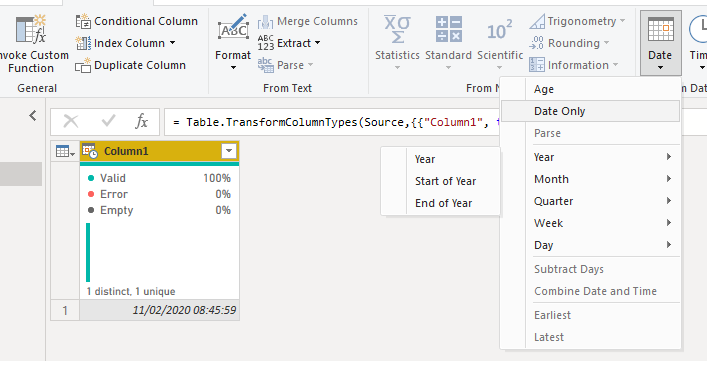
On the query editor be sure that you have the format of the columns as Date/Time then go to add column and select the Date Only, this will give you a new column with only the date part should work as expected.
then delete the initial column
Regards
Miguel Félix
Proud to be a Super User!
Check out my blog: Power BI em PortuguêsHi @Anonymous ,
On the query editor be sure that you have the format of the columns as Date/Time then go to add column and select the Date Only, this will give you a new column with only the date part should work as expected.
then delete the initial column
Regards
Miguel Félix
Proud to be a Super User!
Check out my blog: Power BI em PortuguêsThank you
Join us in Barcelona for FabCon and SQLCon, the Fabric, Power BI, SQL, and AI community event. Save €200 with code FABCMTY200.
Check out the July 2026 Power BI update to learn about new features.
Join Data Days 2026: 60 days of free live/on-demand sessions, challenges, study groups, and certification opportunities.
| User | Count |
|---|---|
| 31 | |
| 30 | |
| 27 | |
| 24 | |
| 16 |
| User | Count |
|---|---|
| 57 | |
| 36 | |
| 27 | |
| 24 | |
| 20 |