cancel
Showing results for 
Search instead for 
Did you mean: 

The Power BI Data Visualization World Championships is back! It's time to submit your entry. Live now!

Reply
Anonymous
Not applicable

Date format problem

How to change the format from 2020-02-11T08:45:58.6470000 to 2020-02-11 in power bi, it returns wrong date and month if i'm using the format function

1 ACCEPTED SOLUTION
MFelix
Super User
Super User

Hi @Anonymous ,


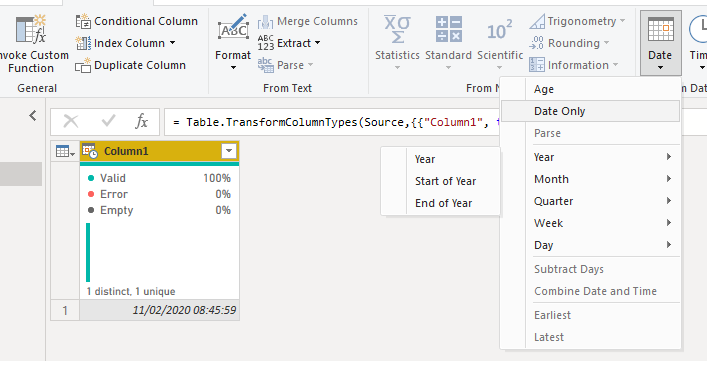
On the query editor be sure that you have the format of the columns as Date/Time then go to add column and select the Date Only, this will give you a new column with only the date part should work as expected.


date.png


then delete the initial column


Regards

Miguel Félix


Did I answer your question? Mark my post as a solution!

Proud to be a Super User!

Check out my blog: Power BI em Português


View solution in original post

2 REPLIES 2
MFelix
Super User
Super User

Hi @Anonymous ,


On the query editor be sure that you have the format of the columns as Date/Time then go to add column and select the Date Only, this will give you a new column with only the date part should work as expected.


date.png


then delete the initial column


Regards

Miguel Félix


Did I answer your question? Mark my post as a solution!

Proud to be a Super User!

Check out my blog: Power BI em Português


Anonymous
Not applicable

Thank you

Helpful resources

Announcements
Power BI DataViz World Championships

Power BI Dataviz World Championships

The Power BI Data Visualization World Championships is back! It's time to submit your entry.

January Power BI Update Carousel

Power BI Monthly Update - January 2026

Check out the January 2026 Power BI update to learn about new features.

FabCon Atlanta 2026 carousel

FabCon Atlanta 2026

Join us at FabCon Atlanta, March 16-20, for the ultimate Fabric, Power BI, AI and SQL community-led event. Save $200 with code FABCOMM.