Share feedback directly with Fabric product managers, participate in targeted research studies and influence the Fabric roadmap.
Sign up nowGet Fabric certified for FREE! Don't miss your chance! Learn more
How to change the format from 2020-02-11T08:45:58.6470000 to 2020-02-11 in power bi, it returns wrong date and month if i'm using the format function
Solved! Go to Solution.
Hi @Anonymous ,
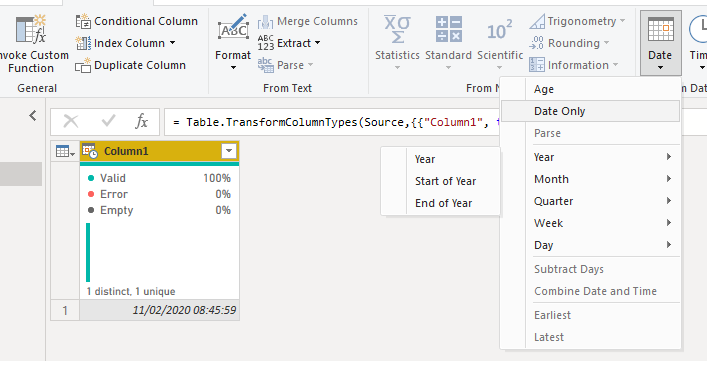
On the query editor be sure that you have the format of the columns as Date/Time then go to add column and select the Date Only, this will give you a new column with only the date part should work as expected.
then delete the initial column
Regards
Miguel Félix
Proud to be a Super User!
Check out my blog: Power BI em PortuguêsHi @Anonymous ,
On the query editor be sure that you have the format of the columns as Date/Time then go to add column and select the Date Only, this will give you a new column with only the date part should work as expected.
then delete the initial column
Regards
Miguel Félix
Proud to be a Super User!
Check out my blog: Power BI em PortuguêsThank you
If you love stickers, then you will definitely want to check out our Community Sticker Challenge!
Check out the January 2026 Power BI update to learn about new features.
| User | Count |
|---|---|
| 61 | |
| 58 | |
| 45 | |
| 21 | |
| 18 |
| User | Count |
|---|---|
| 122 | |
| 119 | |
| 37 | |
| 35 | |
| 29 |