This is best Fabric, Power BI, SQL and AI community event. How do we know? The last event sold out! Save €200 with code FABCMTY200.
Register nowThe Fabric community is upgrading! Read all of the details including the timeline and what you can expect. Learn more
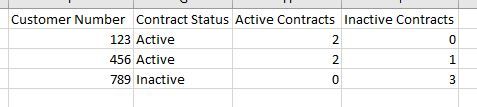
Hello, I am perplexed by a problem on how to manipulate my data. Essentially, I need to create a new column that determines if a customer account is active or inactive based on whether they have any active contracts or not. My raw data is presented like this:
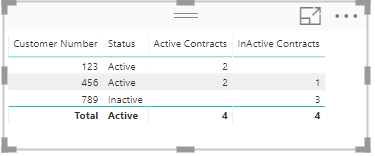
I need to make the above table look like this:
Once I am able to display the above, I can manipulate it to provide the appropriate counts, etc.
Solved! Go to Solution.
Hi @Anonymous
Create 3 measures for this.
Status = IF([Active Contracts]>0, "Active","Inactive")
Active Contracts = CALCULATE(COUNT('Status Column'[Contract Number]), FILTER('Status Column','Status Column'[Status]="Active"))
InActive Contracts = CALCULATE(COUNT('Status Column'[Contract Number]), FILTER('Status Column','Status Column'[Status]="Inactive"))
Hope this is clear.
Thanks
Raj
Hi
Can you please post the data in text format so that it can be copied?
Thanks
Raj
Here you go:
| Customer Number | Contract Number | Contract Status |
| 123 | 1000 | TRUE |
| 123 | 2000 | TRUE |
| 456 | 3000 | FALSE |
| 456 | 4000 | TRUE |
| 456 | 5000 | TRUE |
| 789 | 6000 | FALSE |
| 789 | 7000 | FALSE |
| 789 | 8000 | FALSE |
Hi @Anonymous
Create 3 measures for this.
Status = IF([Active Contracts]>0, "Active","Inactive")
Active Contracts = CALCULATE(COUNT('Status Column'[Contract Number]), FILTER('Status Column','Status Column'[Status]="Active"))
InActive Contracts = CALCULATE(COUNT('Status Column'[Contract Number]), FILTER('Status Column','Status Column'[Status]="Inactive"))
Hope this is clear.
Thanks
Raj
should the 'Status Column' in your measures be the table name? ex: Active Contracts = CALCULATE(COUNT('Sheet1'[Contract Number]), FILTER('Sheet1','Sheet1'[Status]="Active"))
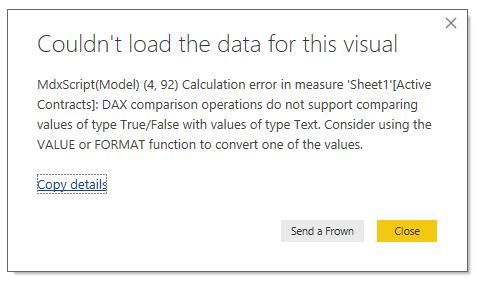
When I use the table/column name conventions, I'm prompted with this dialogue box:
nevermind, i converted the original column into a text type from True/False on the modeling tab.
Join us in Barcelona for FabCon and SQLCon, the Fabric, Power BI, SQL, and AI community event. Save €200 with code FABCMTY200.
| User | Count |
|---|---|
| 27 | |
| 22 | |
| 20 | |
| 18 | |
| 14 |
| User | Count |
|---|---|
| 25 | |
| 20 | |
| 20 | |
| 20 | |
| 20 |