Get certified for free when you join Fabric Data Days 2026 and dive into Fabric, Power BI, SQL, AI, and other essential data skills.
Join nowTry your skills in the Power BI Dataviz World Championship! Round one ends June 26. Join now
Hello, I am perplexed by a problem on how to manipulate my data. Essentially, I need to create a new column that determines if a customer account is active or inactive based on whether they have any active contracts or not. My raw data is presented like this:
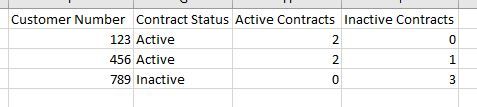
I need to make the above table look like this:
Once I am able to display the above, I can manipulate it to provide the appropriate counts, etc.
Solved! Go to Solution.
Hi @Anonymous
Create 3 measures for this.
Status = IF([Active Contracts]>0, "Active","Inactive")
Active Contracts = CALCULATE(COUNT('Status Column'[Contract Number]), FILTER('Status Column','Status Column'[Status]="Active"))
InActive Contracts = CALCULATE(COUNT('Status Column'[Contract Number]), FILTER('Status Column','Status Column'[Status]="Inactive"))
Hope this is clear.
Thanks
Raj
Hi
Can you please post the data in text format so that it can be copied?
Thanks
Raj
Here you go:
| Customer Number | Contract Number | Contract Status |
| 123 | 1000 | TRUE |
| 123 | 2000 | TRUE |
| 456 | 3000 | FALSE |
| 456 | 4000 | TRUE |
| 456 | 5000 | TRUE |
| 789 | 6000 | FALSE |
| 789 | 7000 | FALSE |
| 789 | 8000 | FALSE |
Hi @Anonymous
Create 3 measures for this.
Status = IF([Active Contracts]>0, "Active","Inactive")
Active Contracts = CALCULATE(COUNT('Status Column'[Contract Number]), FILTER('Status Column','Status Column'[Status]="Active"))
InActive Contracts = CALCULATE(COUNT('Status Column'[Contract Number]), FILTER('Status Column','Status Column'[Status]="Inactive"))
Hope this is clear.
Thanks
Raj
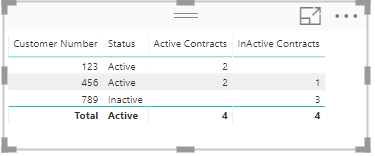
should the 'Status Column' in your measures be the table name? ex: Active Contracts = CALCULATE(COUNT('Sheet1'[Contract Number]), FILTER('Sheet1','Sheet1'[Status]="Active"))
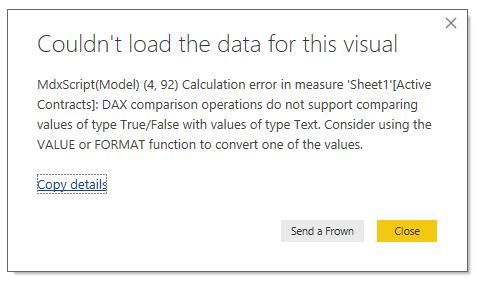
When I use the table/column name conventions, I'm prompted with this dialogue box:
nevermind, i converted the original column into a text type from True/False on the modeling tab.
| User | Count |
|---|---|
| 23 | |
| 22 | |
| 21 | |
| 18 | |
| 11 |
| User | Count |
|---|---|
| 56 | |
| 54 | |
| 43 | |
| 36 | |
| 34 |