cancel
Showing results for 
Search instead for 
Did you mean: 

July 7 - July 17 | Round 2 of the Power BI Dataviz World Championships. Don't miss your chance! Learn more

Reply
Anonymous
Not applicable

Data Manipulation/Calculated Column Creation Help

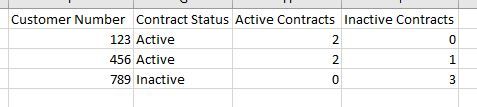
Hello, I am perplexed by a problem on how to manipulate my data.  Essentially, I need to create a new column that determines if a customer account is active or inactive based on whether they have any active contracts or not. My raw data is presented like this:

Origin.jpg


I need to make the above table look like this:

Output.jpg

Once I am able to display the above, I can manipulate it to provide the appropriate counts, etc.

1 ACCEPTED SOLUTION
Anonymous
Not applicable

Hi @Anonymous


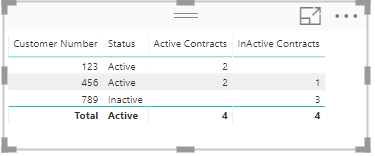
Create 3 measures for this.

Status = IF([Active Contracts]>0, "Active","Inactive")

Active Contracts =  CALCULATE(COUNT('Status Column'[Contract Number]), FILTER('Status Column','Status Column'[Status]="Active"))

InActive Contracts = CALCULATE(COUNT('Status Column'[Contract Number]), FILTER('Status Column','Status Column'[Status]="Inactive"))

Status.PNG 


Hope this is clear.


Thanks
Raj

View solution in original post

5 REPLIES 5
Anonymous
Not applicable

Hi

  Can you please post the data in text format so that it can be copied?


Thanks
Raj

Anonymous
Not applicable


Here you go:

Customer NumberContract NumberContract Status
1231000TRUE
1232000TRUE
4563000FALSE
4564000TRUE
4565000

TRUE

7896000

FALSE

7897000

FALSE

7898000

FALSE


Anonymous
Not applicable

Hi @Anonymous


Create 3 measures for this.

Status = IF([Active Contracts]>0, "Active","Inactive")

Active Contracts =  CALCULATE(COUNT('Status Column'[Contract Number]), FILTER('Status Column','Status Column'[Status]="Active"))

InActive Contracts = CALCULATE(COUNT('Status Column'[Contract Number]), FILTER('Status Column','Status Column'[Status]="Inactive"))

Status.PNG 


Hope this is clear.


Thanks
Raj

Anonymous
Not applicable

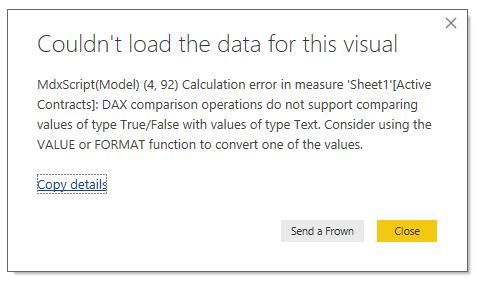
should the 'Status Column' in your measures be the table name? ex: Active Contracts = CALCULATE(COUNT('Sheet1'[Contract Number]), FILTER('Sheet1','Sheet1'[Status]="Active")) 


When I use the table/column name conventions, I'm prompted with this dialogue box:

dialogue.jpg
Anonymous
Not applicable

nevermind, i converted the original column into a text type from True/False on the modeling tab.

Helpful resources

Announcements
FabCon and SQLCon Barcelona 2026

FabCon & SQLCon – Barcelona 2026

Join us in Barcelona for FabCon and SQLCon, the Fabric, Power BI, SQL, and AI community event. Save €200 with code FABCMTY200.

60 days of Data Days Carousel

Data Days 2026

Join Fabric Data Days 2026: 60 days of free live/on-demand sessions, challenges, study groups, and certification opportunities.

Power BI DataViz World Championships carousel

Power BI DataViz World Championships - June 2026

A new Power BI DataViz World Championship is coming this June! Don't miss out on submitting your entry.