This is best Fabric, Power BI, SQL and AI community event. How do we know? The last event sold out! Save €200 with code FABCMTY200.
Register nowA new Data Days event is coming soon! This time we’re going bigger than ever. Fabric, Power BI, SQL, AI and more. Don't miss out.
How do I return a table excluding all rows where [Revenue] is blank, see example below. Which DAX function?
| Customer | Revenue | Disbursement | DateMonth |
| 1 | 156 | 201701 | |
| 2 | 365 | 18 | 201702 |
| 3 | 32 | 201703 | |
| 3 | 69 | 201704 | |
| 2 | 152 | 54 | 201705 |
| 5 | 325 | 21 | 201706 |
| 4 | 145 | 69 | 201707 |
| 2 | 262 | 58 | 201708 |
| 3 | 45 | 201709 | |
| 6 | 326 | 52 | 201710 |
| 1 | 52 | 201711 | |
| 1 | 123 | 201712 |
Solved! Go to Solution.
Hi,
This can be done without a DAX formula. In Power Query, one can simply filter the revenue column on >0.
Hi @David_1970
Please try this calculated table
NewTableName =
FILTER(Table1,
'Table1'[Revenue]<> BLANK()
)
Hi @David_1970,
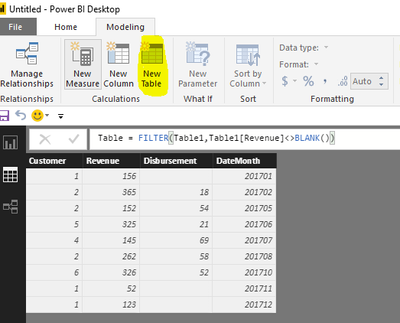
As I tested, the formula @Phil_Seamark posted is right. Please click "New Table" under modeling on Home page(highlighted in yellow background), type the formula, you will get expected result.
Table = FILTER(Table1,Table1[Revenue]<>BLANK())
Best Regards,
Angelia
Hi @David_1970,
As I tested, the formula @Phil_Seamark posted is right. Please click "New Table" under modeling on Home page(highlighted in yellow background), type the formula, you will get expected result.
Table = FILTER(Table1,Table1[Revenue]<>BLANK())
Best Regards,
Angelia
Hi @David_1970
Please try this calculated table
NewTableName =
FILTER(Table1,
'Table1'[Revenue]<> BLANK()
)
Hi,
This can be done without a DAX formula. In Power Query, one can simply filter the revenue column on >0.
NewTableName = SUMMARIZE(
FILTER(Table1,'Table1'[Field1]<> BLANK()),
'Table1'[Field1],
‘Table1’[Field2]
etc.
)
Check out the May 2026 Power BI update to learn about new features.
Sign up to receive a private message when registration opens and key events begin.
If you have recently started exploring Fabric, we'd love to hear how it's going. Your feedback can help with product improvements.
| User | Count |
|---|---|
| 27 | |
| 25 | |
| 23 | |
| 19 | |
| 14 |
| User | Count |
|---|---|
| 50 | |
| 45 | |
| 20 | |
| 18 | |
| 18 |