Join us in Barcelona for FabCon and SQLCon, September 28 - October 1, 2026.
This is best Fabric, Power BI, SQL and AI community event. How do we know? The last event sold out! Save €200 with code FABCMTY200.
Register now- Power BI forums
- Get Help with Power BI
- Desktop
- Service
- Report Server
- Power Query
- Mobile Apps
- Developer
- DAX Commands and Tips
- Custom Visuals Development Discussion
- Health and Life Sciences
- Power BI Spanish forums
- Translated Spanish Desktop
- Training and Consulting
- Instructor Led Training
- Dashboard in a Day for Women, by Women
- Galleries
- Data Stories Gallery
- Themes Gallery
- Contests Gallery
- QuickViz Gallery
- Quick Measures Gallery
- Visual Calculations Gallery
- Fabric Apps Gallery
- Notebook Gallery
- Translytical Task Flow Gallery
- TMDL Gallery
- R Script Showcase
- Webinars and Video Gallery
- Ideas
- Custom Visuals Ideas (read-only)
- Issues
- Issues
- Events
- Upcoming Events
The Fabric community is upgrading! Read all of the details including the timeline and what you can expect. Learn more
- Power BI forums
- Forums
- Get Help with Power BI
- Desktop
- Creating measure
- Subscribe to RSS Feed
- Mark Topic as New
- Mark Topic as Read
- Float this Topic for Current User
- Bookmark
- Subscribe
- Printer Friendly Page

- Mark as New
- Bookmark
- Subscribe
- Mute
- Subscribe to RSS Feed
- Permalink
- Report Inappropriate Content
Creating measure
How do I return a table excluding all rows where [Revenue] is blank, see example below. Which DAX function?
| Customer | Revenue | Disbursement | DateMonth |
| 1 | 156 | 201701 | |
| 2 | 365 | 18 | 201702 |
| 3 | 32 | 201703 | |
| 3 | 69 | 201704 | |
| 2 | 152 | 54 | 201705 |
| 5 | 325 | 21 | 201706 |
| 4 | 145 | 69 | 201707 |
| 2 | 262 | 58 | 201708 |
| 3 | 45 | 201709 | |
| 6 | 326 | 52 | 201710 |
| 1 | 52 | 201711 | |
| 1 | 123 | 201712 |
Solved! Go to Solution.


- Mark as New
- Bookmark
- Subscribe
- Mute
- Subscribe to RSS Feed
- Permalink
- Report Inappropriate Content
Hi,
This can be done without a DAX formula. In Power Query, one can simply filter the revenue column on >0.
Regards,
Ashish Mathur
http://www.ashishmathur.com
https://www.linkedin.com/in/excelenthusiasts/


- Mark as New
- Bookmark
- Subscribe
- Mute
- Subscribe to RSS Feed
- Permalink
- Report Inappropriate Content
Hi @David_1970
Please try this calculated table
NewTableName =
        FILTER(Table1,
		'Table1'[Revenue]<> BLANK()
		)

- Mark as New
- Bookmark
- Subscribe
- Mute
- Subscribe to RSS Feed
- Permalink
- Report Inappropriate Content
Hi @David_1970,
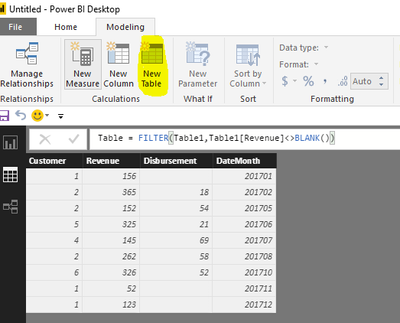
As I tested, the formula @Phil_Seamark posted is right. Please click "New Table" under modeling on Home page(highlighted in yellow background), type the formula, you will get expected result.
Table = FILTER(Table1,Table1[Revenue]<>BLANK())
Best Regards,
Angelia
- Mark as New
- Bookmark
- Subscribe
- Mute
- Subscribe to RSS Feed
- Permalink
- Report Inappropriate Content
Hi @David_1970,
As I tested, the formula @Phil_Seamark posted is right. Please click "New Table" under modeling on Home page(highlighted in yellow background), type the formula, you will get expected result.
Table = FILTER(Table1,Table1[Revenue]<>BLANK())
Best Regards,
Angelia
- Mark as New
- Bookmark
- Subscribe
- Mute
- Subscribe to RSS Feed
- Permalink
- Report Inappropriate Content
Hi @David_1970
Please try this calculated table
NewTableName =
        FILTER(Table1,
		'Table1'[Revenue]<> BLANK()
		)
- Mark as New
- Bookmark
- Subscribe
- Mute
- Subscribe to RSS Feed
- Permalink
- Report Inappropriate Content
Hi,
This can be done without a DAX formula. In Power Query, one can simply filter the revenue column on >0.
Regards,
Ashish Mathur
http://www.ashishmathur.com
https://www.linkedin.com/in/excelenthusiasts/


- Mark as New
- Bookmark
- Subscribe
- Mute
- Subscribe to RSS Feed
- Permalink
- Report Inappropriate Content
NewTableName = SUMMARIZE(
FILTER(Table1,'Table1'[Field1]<> BLANK()),
'Table1'[Field1],
‘Table1’[Field2]
etc.
)

Helpful resources

FabCon & SQLCon – Barcelona 2026
Join us in Barcelona for FabCon and SQLCon, the Fabric, Power BI, SQL, and AI community event. Save €200 with code FABCMTY200.

Power BI DataViz World Championships - June 2026
A new Power BI DataViz World Championship is coming this June! Don't miss out on submitting your entry.

| User | Count |
|---|---|
| 23 | |
| 22 | |
| 14 | |
| 14 | |
| 13 |


| User | Count |
|---|---|
| 45 | |
| 38 | |
| 24 | |
| 22 | |
| 20 |


