Get certified for free when you join Fabric Data Days 2026 and dive into Fabric, Power BI, SQL, AI, and other essential data skills.
Join nowData Days is here! Join us now for 60+ days of learning, challenges, and connection. Learn more
How do I return a table excluding all rows where [Revenue] is blank, see example below. Which DAX function?
| Customer | Revenue | Disbursement | DateMonth |
| 1 | 156 | 201701 | |
| 2 | 365 | 18 | 201702 |
| 3 | 32 | 201703 | |
| 3 | 69 | 201704 | |
| 2 | 152 | 54 | 201705 |
| 5 | 325 | 21 | 201706 |
| 4 | 145 | 69 | 201707 |
| 2 | 262 | 58 | 201708 |
| 3 | 45 | 201709 | |
| 6 | 326 | 52 | 201710 |
| 1 | 52 | 201711 | |
| 1 | 123 | 201712 |
Solved! Go to Solution.
Hi,
This can be done without a DAX formula. In Power Query, one can simply filter the revenue column on >0.
Hi @David_1970
Please try this calculated table
NewTableName =
FILTER(Table1,
'Table1'[Revenue]<> BLANK()
)
Hi @David_1970,
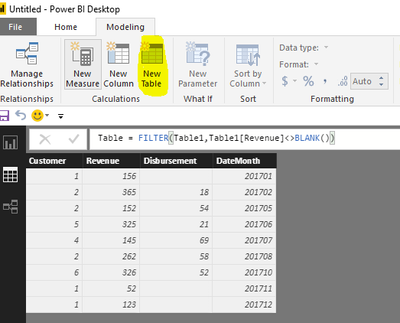
As I tested, the formula @Phil_Seamark posted is right. Please click "New Table" under modeling on Home page(highlighted in yellow background), type the formula, you will get expected result.
Table = FILTER(Table1,Table1[Revenue]<>BLANK())
Best Regards,
Angelia
Hi @David_1970,
As I tested, the formula @Phil_Seamark posted is right. Please click "New Table" under modeling on Home page(highlighted in yellow background), type the formula, you will get expected result.
Table = FILTER(Table1,Table1[Revenue]<>BLANK())
Best Regards,
Angelia
Hi @David_1970
Please try this calculated table
NewTableName =
FILTER(Table1,
'Table1'[Revenue]<> BLANK()
)
Hi,
This can be done without a DAX formula. In Power Query, one can simply filter the revenue column on >0.
NewTableName = SUMMARIZE(
FILTER(Table1,'Table1'[Field1]<> BLANK()),
'Table1'[Field1],
‘Table1’[Field2]
etc.
)
Don't miss out on Data Days, June 15 through August 7. Learn Fabric, Power BI, SQL, AI and more.
Check out the May 2026 Power BI update to learn about new features.
| User | Count |
|---|---|
| 23 | |
| 21 | |
| 20 | |
| 18 | |
| 13 |
| User | Count |
|---|---|
| 58 | |
| 50 | |
| 38 | |
| 31 | |
| 27 |