Join us at FabCon Atlanta from March 16 - 20, 2026, for the ultimate Fabric, Power BI, AI and SQL community-led event. Save $200 with code FABCOMM.
Register now!Vote for your favorite vizzies from the Power BI Dataviz World Championship submissions. Vote now!
How do I return a table excluding all rows where [Revenue] is blank, see example below. Which DAX function?
| Customer | Revenue | Disbursement | DateMonth |
| 1 | 156 | 201701 | |
| 2 | 365 | 18 | 201702 |
| 3 | 32 | 201703 | |
| 3 | 69 | 201704 | |
| 2 | 152 | 54 | 201705 |
| 5 | 325 | 21 | 201706 |
| 4 | 145 | 69 | 201707 |
| 2 | 262 | 58 | 201708 |
| 3 | 45 | 201709 | |
| 6 | 326 | 52 | 201710 |
| 1 | 52 | 201711 | |
| 1 | 123 | 201712 |
Solved! Go to Solution.
Hi,
This can be done without a DAX formula. In Power Query, one can simply filter the revenue column on >0.
Hi @David_1970
Please try this calculated table
NewTableName =
FILTER(Table1,
'Table1'[Revenue]<> BLANK()
)
Hi @David_1970,
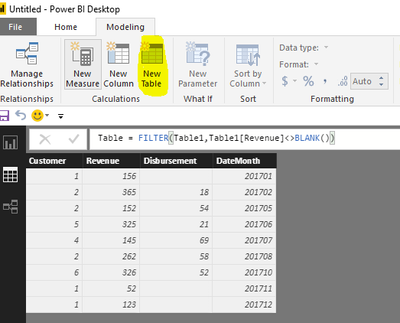
As I tested, the formula @Phil_Seamark posted is right. Please click "New Table" under modeling on Home page(highlighted in yellow background), type the formula, you will get expected result.
Table = FILTER(Table1,Table1[Revenue]<>BLANK())
Best Regards,
Angelia
Hi @David_1970,
As I tested, the formula @Phil_Seamark posted is right. Please click "New Table" under modeling on Home page(highlighted in yellow background), type the formula, you will get expected result.
Table = FILTER(Table1,Table1[Revenue]<>BLANK())
Best Regards,
Angelia
Hi @David_1970
Please try this calculated table
NewTableName =
FILTER(Table1,
'Table1'[Revenue]<> BLANK()
)
Hi,
This can be done without a DAX formula. In Power Query, one can simply filter the revenue column on >0.
NewTableName = SUMMARIZE(
FILTER(Table1,'Table1'[Field1]<> BLANK()),
'Table1'[Field1],
‘Table1’[Field2]
etc.
)
Vote for your favorite vizzies from the Power BI World Championship submissions!
If you love stickers, then you will definitely want to check out our Community Sticker Challenge!
Check out the January 2026 Power BI update to learn about new features.
| User | Count |
|---|---|
| 63 | |
| 50 | |
| 41 | |
| 19 | |
| 16 |
| User | Count |
|---|---|
| 125 | |
| 108 | |
| 46 | |
| 29 | |
| 27 |