Don't miss your chance to take the Fabric Data Engineer (DP-600) exam for FREE! Find out how by watching the DP-600 session on-demand now through April 28th.
Learn moreJoin the FabCon + SQLCon recap series. Up next: Power BI, Real-Time Intelligence, IQ and AI, and Data Factory take center stage. All sessions are available on-demand after the live show. Register now
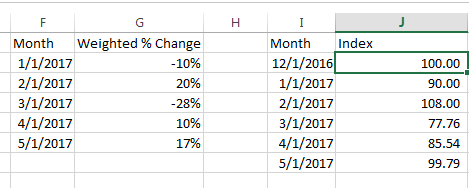
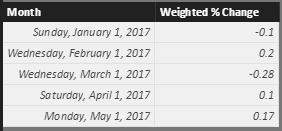
I'm fairly new to PowerBI and am trying to figure out how to do this. I've done quite a bit of googling and couldn't find a solution this is issue. I have a calculated table in PowerBI similar to columns F/G (Or a measure that outputs that percent as well if it is easier). I would like to calculate columns J to be able to graph, to tell a better overall picture than graphing G. This is easy in excel, make the first column 100, and then for every next row do, (the last row) * (1+ Weighted % Change). However after about 4-5 hours of trying and researching I couldn't figure out how to get this to work in PowerBI.
Solved! Go to Solution.
Hi @askelton,
You can refer to below formulas to calculate current row with recursive previous row:
Create a new table with original data and new row(first date):
Merged =
var temp= FIRSTDATE(Table1[Month])
return
UNION(ROW("Month",DATE(YEAR(temp),MONTH(temp)-1,DAY(temp)),"Weight % Change",0),Table1)
Measures:
Default Amount = if(MAX([Month])=FIRSTDATE(ALL(Merged[Month])),100)
Multiply Percent =
IF (
ISBLANK ( [Default Amount] ),
1 + MAX(Merged[Weight % Change]),
[Default Amount]
)
Cumulated LN =
CALCULATE (
SUMX ( FILTER(ALL(Merged),[Month]<=MAX(Merged[Month])), LN ( [Multiply Percent] ) )
)
Recursive Calculations =
SUMX (
VALUES ( 'Merged' ),
IF ( ISBLANK ( [Default Amount] ), EXP ( [Cumulated LN] ), [Default Amount] )
)
Reference link:
Recursive Calculations in PowerPivot using DAX
Regards,
Xiaoxin Sheng
Hi @askelton,
You can refer to below formulas to calculate current row with recursive previous row:
Create a new table with original data and new row(first date):
Merged =
var temp= FIRSTDATE(Table1[Month])
return
UNION(ROW("Month",DATE(YEAR(temp),MONTH(temp)-1,DAY(temp)),"Weight % Change",0),Table1)
Measures:
Default Amount = if(MAX([Month])=FIRSTDATE(ALL(Merged[Month])),100)
Multiply Percent =
IF (
ISBLANK ( [Default Amount] ),
1 + MAX(Merged[Weight % Change]),
[Default Amount]
)
Cumulated LN =
CALCULATE (
SUMX ( FILTER(ALL(Merged),[Month]<=MAX(Merged[Month])), LN ( [Multiply Percent] ) )
)
Recursive Calculations =
SUMX (
VALUES ( 'Merged' ),
IF ( ISBLANK ( [Default Amount] ), EXP ( [Cumulated LN] ), [Default Amount] )
)
Reference link:
Recursive Calculations in PowerPivot using DAX
Regards,
Xiaoxin Sheng
Regards
Miguel Félix
Proud to be a Super User!
Check out my blog: Power BI em PortuguêsCheck out the April 2026 Power BI update to learn about new features.
If you have recently started exploring Fabric, we'd love to hear how it's going. Your feedback can help with product improvements.
A new Power BI DataViz World Championship is coming this June! Don't miss out on submitting your entry.
| User | Count |
|---|---|
| 45 | |
| 38 | |
| 34 | |
| 21 | |
| 17 |
| User | Count |
|---|---|
| 66 | |
| 65 | |
| 31 | |
| 26 | |
| 26 |