Don't miss your chance to take the Fabric Data Engineer (DP-600) exam for FREE! Find out how by attending the DP-600 session on April 23rd (pacific time), live or on-demand.
Learn moreNext up in the FabCon + SQLCon recap series: The roadmap for Microsoft SQL and Maximizing Developer experiences in Fabric. All sessions are available on-demand after the live show. Register now
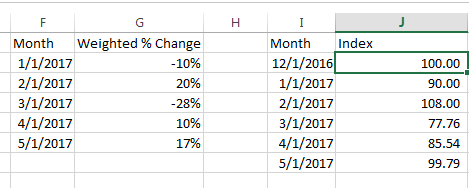
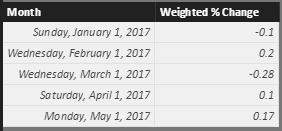
I'm fairly new to PowerBI and am trying to figure out how to do this. I've done quite a bit of googling and couldn't find a solution this is issue. I have a calculated table in PowerBI similar to columns F/G (Or a measure that outputs that percent as well if it is easier). I would like to calculate columns J to be able to graph, to tell a better overall picture than graphing G. This is easy in excel, make the first column 100, and then for every next row do, (the last row) * (1+ Weighted % Change). However after about 4-5 hours of trying and researching I couldn't figure out how to get this to work in PowerBI.
Solved! Go to Solution.
Hi @askelton,
You can refer to below formulas to calculate current row with recursive previous row:
Create a new table with original data and new row(first date):
Merged =
var temp= FIRSTDATE(Table1[Month])
return
UNION(ROW("Month",DATE(YEAR(temp),MONTH(temp)-1,DAY(temp)),"Weight % Change",0),Table1)
Measures:
Default Amount = if(MAX([Month])=FIRSTDATE(ALL(Merged[Month])),100)
Multiply Percent =
IF (
ISBLANK ( [Default Amount] ),
1 + MAX(Merged[Weight % Change]),
[Default Amount]
)
Cumulated LN =
CALCULATE (
SUMX ( FILTER(ALL(Merged),[Month]<=MAX(Merged[Month])), LN ( [Multiply Percent] ) )
)
Recursive Calculations =
SUMX (
VALUES ( 'Merged' ),
IF ( ISBLANK ( [Default Amount] ), EXP ( [Cumulated LN] ), [Default Amount] )
)
Reference link:
Recursive Calculations in PowerPivot using DAX
Regards,
Xiaoxin Sheng
Hi @askelton,
You can refer to below formulas to calculate current row with recursive previous row:
Create a new table with original data and new row(first date):
Merged =
var temp= FIRSTDATE(Table1[Month])
return
UNION(ROW("Month",DATE(YEAR(temp),MONTH(temp)-1,DAY(temp)),"Weight % Change",0),Table1)
Measures:
Default Amount = if(MAX([Month])=FIRSTDATE(ALL(Merged[Month])),100)
Multiply Percent =
IF (
ISBLANK ( [Default Amount] ),
1 + MAX(Merged[Weight % Change]),
[Default Amount]
)
Cumulated LN =
CALCULATE (
SUMX ( FILTER(ALL(Merged),[Month]<=MAX(Merged[Month])), LN ( [Multiply Percent] ) )
)
Recursive Calculations =
SUMX (
VALUES ( 'Merged' ),
IF ( ISBLANK ( [Default Amount] ), EXP ( [Cumulated LN] ), [Default Amount] )
)
Reference link:
Recursive Calculations in PowerPivot using DAX
Regards,
Xiaoxin Sheng
Regards
Miguel Félix
Proud to be a Super User!
Check out my blog: Power BI em PortuguêsIf you have recently started exploring Fabric, we'd love to hear how it's going. Your feedback can help with product improvements.
A new Power BI DataViz World Championship is coming this June! Don't miss out on submitting your entry.
| User | Count |
|---|---|
| 46 | |
| 43 | |
| 39 | |
| 20 | |
| 15 |
| User | Count |
|---|---|
| 68 | |
| 68 | |
| 31 | |
| 27 | |
| 24 |