Join us at FabCon Atlanta from March 16 - 20, 2026, for the ultimate Fabric, Power BI, AI and SQL community-led event. Save $200 with code FABCOMM.
Register now!The Power BI Data Visualization World Championships is back! Get ahead of the game and start preparing now! Learn more
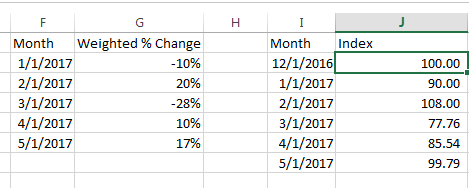
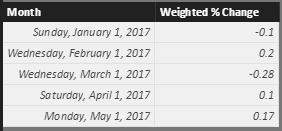
I'm fairly new to PowerBI and am trying to figure out how to do this. I've done quite a bit of googling and couldn't find a solution this is issue. I have a calculated table in PowerBI similar to columns F/G (Or a measure that outputs that percent as well if it is easier). I would like to calculate columns J to be able to graph, to tell a better overall picture than graphing G. This is easy in excel, make the first column 100, and then for every next row do, (the last row) * (1+ Weighted % Change). However after about 4-5 hours of trying and researching I couldn't figure out how to get this to work in PowerBI.
Solved! Go to Solution.
Hi @askelton,
You can refer to below formulas to calculate current row with recursive previous row:
Create a new table with original data and new row(first date):
Merged =
var temp= FIRSTDATE(Table1[Month])
return
UNION(ROW("Month",DATE(YEAR(temp),MONTH(temp)-1,DAY(temp)),"Weight % Change",0),Table1)
Measures:
Default Amount = if(MAX([Month])=FIRSTDATE(ALL(Merged[Month])),100)
Multiply Percent =
IF (
ISBLANK ( [Default Amount] ),
1 + MAX(Merged[Weight % Change]),
[Default Amount]
)
Cumulated LN =
CALCULATE (
SUMX ( FILTER(ALL(Merged),[Month]<=MAX(Merged[Month])), LN ( [Multiply Percent] ) )
)
Recursive Calculations =
SUMX (
VALUES ( 'Merged' ),
IF ( ISBLANK ( [Default Amount] ), EXP ( [Cumulated LN] ), [Default Amount] )
)
Reference link:
Recursive Calculations in PowerPivot using DAX
Regards,
Xiaoxin Sheng
Hi @askelton,
You can refer to below formulas to calculate current row with recursive previous row:
Create a new table with original data and new row(first date):
Merged =
var temp= FIRSTDATE(Table1[Month])
return
UNION(ROW("Month",DATE(YEAR(temp),MONTH(temp)-1,DAY(temp)),"Weight % Change",0),Table1)
Measures:
Default Amount = if(MAX([Month])=FIRSTDATE(ALL(Merged[Month])),100)
Multiply Percent =
IF (
ISBLANK ( [Default Amount] ),
1 + MAX(Merged[Weight % Change]),
[Default Amount]
)
Cumulated LN =
CALCULATE (
SUMX ( FILTER(ALL(Merged),[Month]<=MAX(Merged[Month])), LN ( [Multiply Percent] ) )
)
Recursive Calculations =
SUMX (
VALUES ( 'Merged' ),
IF ( ISBLANK ( [Default Amount] ), EXP ( [Cumulated LN] ), [Default Amount] )
)
Reference link:
Recursive Calculations in PowerPivot using DAX
Regards,
Xiaoxin Sheng
Regards
Miguel Félix
Proud to be a Super User!
Check out my blog: Power BI em PortuguêsThe Power BI Data Visualization World Championships is back! Get ahead of the game and start preparing now!
| User | Count |
|---|---|
| 40 | |
| 35 | |
| 34 | |
| 31 | |
| 28 |
| User | Count |
|---|---|
| 137 | |
| 102 | |
| 68 | |
| 66 | |
| 64 |