cancel
Showing results for 
Search instead for 
Did you mean: 

July 28 - August 9 | Final Round of the Power BI Dataviz World Championships. This is your chance. Learn more

Reply
MarcoDekker
Helper I
Helper I

Count Distinct combining two tables

Hi all,

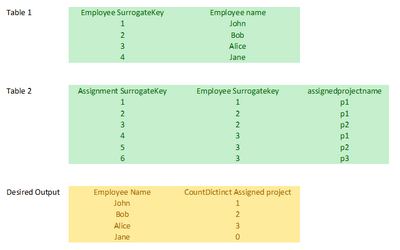
Hope you can help me. Been struggling with this for some time now. I have two tables: one with employee data and another with their projectassignments. I just need a simple grid with their names and number of assignments. Can you please help as this count of assignment measure drives me mad.

MarcoDekker_0-1670339648563.png

Thanks in advance.

1 ACCEPTED SOLUTION

@MarcoDekker Try: 

Measure = COUNTROWS(DISTINCT(SELECTCOLUMNS('Table 2',"__name",[assignedprojectname]))) + 0


Follow on LinkedIn
@ me in replies or I'll lose your thread!!!
Instead of a Kudo, please vote for this idea
Become an expert!: Enterprise DNA
External Tools: MSHGQM
YouTube Channel!: Microsoft Hates Greg
Latest book!:
DAX For Humans

DAX is easy, CALCULATE makes DAX hard...

View solution in original post

6 REPLIES 6
MarcoDekker
Helper I
Helper I

Great! thanks @Greg_Deckler!

MarcoDekker
Helper I
Helper I

hi @Greg_Deckler, Thanks a lot. it works indeed! I have one more question.

In table 1 i have more columns. When i create the report and add more attributes from this table, i get some kind of cartesian product. Why is this?

b.t.w. i create visualisations with direct query on a tabular model.

@MarcoDekker I'm not sure. Can you share a screen shot or more information?


Follow on LinkedIn
@ me in replies or I'll lose your thread!!!
Instead of a Kudo, please vote for this idea
Become an expert!: Enterprise DNA
External Tools: MSHGQM
YouTube Channel!: Microsoft Hates Greg
Latest book!:
DAX For Humans

DAX is easy, CALCULATE makes DAX hard...

Hi @Greg_Deckler .  Alas, not able to reproduce this behaviour in the test pibx.  Will continue to try.

But i realised, i miss Jane in the output. Can we generate some kind of left outer join in Dax? Jane does not have projects assigned, yet she need to show up in the report. 

@MarcoDekker Try: 

Measure = COUNTROWS(DISTINCT(SELECTCOLUMNS('Table 2',"__name",[assignedprojectname]))) + 0


Follow on LinkedIn
@ me in replies or I'll lose your thread!!!
Instead of a Kudo, please vote for this idea
Become an expert!: Enterprise DNA
External Tools: MSHGQM
YouTube Channel!: Microsoft Hates Greg
Latest book!:
DAX For Humans

DAX is easy, CALCULATE makes DAX hard...
Greg_Deckler
Community Champion
Community Champion

@MarcoDekker Try:

Measure = COUNTROWS(DISTINCT(SELECTCOLUMNS('Table 2',"__name",[assignedprojectname])))


Follow on LinkedIn
@ me in replies or I'll lose your thread!!!
Instead of a Kudo, please vote for this idea
Become an expert!: Enterprise DNA
External Tools: MSHGQM
YouTube Channel!: Microsoft Hates Greg
Latest book!:
DAX For Humans

DAX is easy, CALCULATE makes DAX hard...

Helpful resources

Announcements
Fabric Community Sticker Design Challenge Barcelona Carousel

Fabric Community Sticker Challenge - Barcelona 2026

If you love stickers, then you will definitely want to check out our community sticker challenge, Barcelona edition!

July Power BI Update Carousel

Power BI Monthly Update - July 2026

Check out the July 2026 Power BI update to learn about new features.

Power BI DataViz World Championships carousel

Power BI DataViz World Championships - June 2026

A new Power BI DataViz World Championship is coming this June! Don't miss out on submitting your entry.

Top Solution Authors