Get certified for free when you join Fabric Data Days 2026 and dive into Fabric, Power BI, SQL, AI, and other essential data skills.
Join nowData Days is here! Join us now for 60+ days of learning, challenges, and connection. Learn more
Hello everyone,
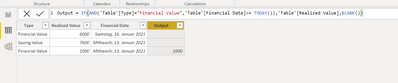
I am trying to calculate output column. Can anyone help me here?
Output = If Type = "Financial Value" and Financial date =< Today then print Realized column value to the output column else blank.
Solved! Go to Solution.
@Anonymous
You can use the following code as a new column:
New Column =
IF (
Table[Type] = "Financial Value"
&& Table[Financial Date] <= TODAY (),
Table[Realized Value],
BLANK ()
)________________________
If my answer was helpful, please click Accept it as the solution to help other members find it useful
Click on the Thumbs-Up icon if you like this reply 🙂
⭕ Subscribe and learn Power BI from these videos
⚪ Website ⚪ LinkedIn ⚪ PBI User Group
Hi Schree185,
The following formula should work.
But one thing. In your picture one time the output value was taken for a row with "Saving Value". Is that right? If yes then you may have to adjust the rule.
Best regards
Mikelytics
@Mikelytics Hi,
I want to add one more condition . Can you help me with this.
Output = If Type = "Financial Value" and Financial date =< Today then print Realized column value * "allocation percetange" to the output column else blank.
I took Saving value by mistake. I am sorry for tht.
@Anonymous
You can use the following code as a new column:
New Column =
IF (
Table[Type] = "Financial Value"
&& Table[Financial Date] <= TODAY (),
Table[Realized Value],
BLANK ()
)________________________
If my answer was helpful, please click Accept it as the solution to help other members find it useful
Click on the Thumbs-Up icon if you like this reply 🙂
⭕ Subscribe and learn Power BI from these videos
⚪ Website ⚪ LinkedIn ⚪ PBI User Group
Hi,
I want to add one more condition
Output = If Type = "Financial Value" and Financial date =< Today then print Realized column value * "allocation percetange" to the output column else blank.
Don't miss out on Data Days, June 15 through August 7. Learn Fabric, Power BI, SQL, AI and more.
Check out the May 2026 Power BI update to learn about new features.
| User | Count |
|---|---|
| 23 | |
| 21 | |
| 20 | |
| 19 | |
| 13 |
| User | Count |
|---|---|
| 58 | |
| 52 | |
| 37 | |
| 31 | |
| 27 |