cancel
Showing results for 
Search instead for 
Did you mean: 

A new Data Days event is coming soon! This time we’re going bigger than ever. Fabric, Power BI, SQL, AI and more. Don't miss out.

Reply
Anonymous
Not applicable

Conditional based output

Hello everyone,


I am trying to calculate output column. Can anyone help me here?


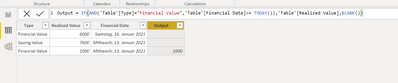
Output = If Type = "Financial Value" and Financial date =< Today then print Realized column value to the output column else blank.

Shree185_0-1610653168460.png


1 ACCEPTED SOLUTION
Fowmy
Super User
Super User

@Anonymous 

You can use the following code as a new column:

New Column =
IF (
    Table[Type] = "Financial Value"
        && Table[Financial Date] <= TODAY (),
    Table[Realized Value],
    BLANK ()
)

________________________

If my answer was helpful, please click Accept it as the solution to help other members find it useful

Click on the Thumbs-Up icon if you like this reply 🙂


Website YouTube  LinkedIn

Did I answer your question? Mark my post as a solution! and hit thumbs up


Subscribe and learn Power BI from these videos

Website LinkedIn PBI User Group

View solution in original post

5 REPLIES 5
Mikelytics
Resident Rockstar
Resident Rockstar

Hi Schree185, 


The following formula should work. 


Output = IF(AND('Table'[Type]="Financial Value",'Table'[Financial Date]<= TODAY()),'Table'[Realized Value],BLANK())


Mikelytics_0-1610654862358.png


But one thing. In your picture one time the output value was taken for a row with "Saving Value". Is that right? If yes then you may have to adjust the rule.


Best regards

Mikelytics


------------------------------------------------------------------
Visit my blog datenhungrig which I recently started with content about business intelligence and Power BI in German and English or follow me on LinkedIn!
Anonymous
Not applicable

@Mikelytics Hi,


I want to add one more condition . Can you help me with this.

Output = If Type = "Financial Value" and Financial date =< Today then print Realized column value * "allocation percetange" to the output column else blank.

Shree185_0-1610736139979.png


Anonymous
Not applicable

I took Saving value by mistake. I am sorry for tht.

Fowmy
Super User
Super User

@Anonymous 

You can use the following code as a new column:

New Column =
IF (
    Table[Type] = "Financial Value"
        && Table[Financial Date] <= TODAY (),
    Table[Realized Value],
    BLANK ()
)

________________________

If my answer was helpful, please click Accept it as the solution to help other members find it useful

Click on the Thumbs-Up icon if you like this reply 🙂


Website YouTube  LinkedIn

Did I answer your question? Mark my post as a solution! and hit thumbs up


Subscribe and learn Power BI from these videos

Website LinkedIn PBI User Group

Anonymous
Not applicable

Hi,

I want to add one more condition 

Output = If Type = "Financial Value" and Financial date =< Today then print Realized column value * "allocation percetange" to the output column else blank.

Shree185_0-1610736139979.png

Helpful resources

Announcements
May Power BI Update Carousel

Power BI Monthly Update - May 2026

Check out the May 2026 Power BI update to learn about new features.

Fabric SQL PBI Data Days

Data Days 2026 coming soon!

Sign up to receive a private message when registration opens and key events begin.

New to Fabric survey Carousel

New to Fabric Survey

If you have recently started exploring Fabric, we'd love to hear how it's going. Your feedback can help with product improvements.

Power BI DataViz World Championships carousel

Power BI DataViz World Championships - June 2026

A new Power BI DataViz World Championship is coming this June! Don't miss out on submitting your entry.