Get certified for free when you join Fabric Data Days 2026 and dive into Fabric, Power BI, SQL, AI, and other essential data skills.
Join nowJuly 28 - August 9 | Final Round of the Power BI Dataviz World Championships. This is your chance. Learn more
Hello everyone,
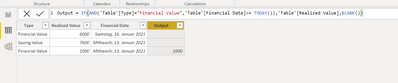
I am trying to calculate output column. Can anyone help me here?
Output = If Type = "Financial Value" and Financial date =< Today then print Realized column value to the output column else blank.
Solved! Go to Solution.
@Anonymous
You can use the following code as a new column:
New Column =
IF (
Table[Type] = "Financial Value"
&& Table[Financial Date] <= TODAY (),
Table[Realized Value],
BLANK ()
)________________________
If my answer was helpful, please click Accept it as the solution to help other members find it useful
Click on the Thumbs-Up icon if you like this reply 🙂
⭕ Subscribe and learn Power BI from these videos
⚪ Website ⚪ LinkedIn ⚪ PBI User Group
Hi Schree185,
The following formula should work.
But one thing. In your picture one time the output value was taken for a row with "Saving Value". Is that right? If yes then you may have to adjust the rule.
Best regards
Mikelytics
@Mikelytics Hi,
I want to add one more condition . Can you help me with this.
Output = If Type = "Financial Value" and Financial date =< Today then print Realized column value * "allocation percetange" to the output column else blank.
I took Saving value by mistake. I am sorry for tht.
@Anonymous
You can use the following code as a new column:
New Column =
IF (
Table[Type] = "Financial Value"
&& Table[Financial Date] <= TODAY (),
Table[Realized Value],
BLANK ()
)________________________
If my answer was helpful, please click Accept it as the solution to help other members find it useful
Click on the Thumbs-Up icon if you like this reply 🙂
⭕ Subscribe and learn Power BI from these videos
⚪ Website ⚪ LinkedIn ⚪ PBI User Group
Hi,
I want to add one more condition
Output = If Type = "Financial Value" and Financial date =< Today then print Realized column value * "allocation percetange" to the output column else blank.
Join us in Barcelona for FabCon and SQLCon, the Fabric, Power BI, SQL, and AI community event. Save €200 with code FABCMTY200.
If you love stickers, then you will definitely want to check out our community sticker challenge, Barcelona edition!
Check out the July 2026 Power BI update to learn about new features.
| User | Count |
|---|---|
| 30 | |
| 28 | |
| 25 | |
| 24 | |
| 16 |
| User | Count |
|---|---|
| 45 | |
| 32 | |
| 17 | |
| 16 | |
| 16 |