cancel
Showing results for 
Search instead for 
Did you mean: 

Get Fabric Certified for FREE during AI Skills Fest. This week only. Secure your voucher now.

Reply
Anonymous
Not applicable

Conditional based output

Hello everyone,


I am trying to calculate output column. Can anyone help me here?


Output = If Type = "Financial Value" and Financial date =< Today then print Realized column value to the output column else blank.

Shree185_0-1610653168460.png


1 ACCEPTED SOLUTION
Fowmy
Super User
Super User

@Anonymous 

You can use the following code as a new column:

New Column =
IF (
    Table[Type] = "Financial Value"
        && Table[Financial Date] <= TODAY (),
    Table[Realized Value],
    BLANK ()
)

________________________

If my answer was helpful, please click Accept it as the solution to help other members find it useful

Click on the Thumbs-Up icon if you like this reply 🙂


Website YouTube  LinkedIn

Did I answer your question? Mark my post as a solution! and hit thumbs up


Subscribe and learn Power BI from these videos

Website LinkedIn PBI User Group

View solution in original post

5 REPLIES 5
Mikelytics
Resident Rockstar
Resident Rockstar

Hi Schree185, 


The following formula should work. 


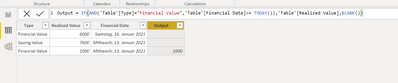
Output = IF(AND('Table'[Type]="Financial Value",'Table'[Financial Date]<= TODAY()),'Table'[Realized Value],BLANK())


Mikelytics_0-1610654862358.png


But one thing. In your picture one time the output value was taken for a row with "Saving Value". Is that right? If yes then you may have to adjust the rule.


Best regards

Mikelytics


------------------------------------------------------------------
Visit my blog datenhungrig which I recently started with content about business intelligence and Power BI in German and English or follow me on LinkedIn!
Anonymous
Not applicable

@Mikelytics Hi,


I want to add one more condition . Can you help me with this.

Output = If Type = "Financial Value" and Financial date =< Today then print Realized column value * "allocation percetange" to the output column else blank.

Shree185_0-1610736139979.png


Anonymous
Not applicable

I took Saving value by mistake. I am sorry for tht.

Fowmy
Super User
Super User

@Anonymous 

You can use the following code as a new column:

New Column =
IF (
    Table[Type] = "Financial Value"
        && Table[Financial Date] <= TODAY (),
    Table[Realized Value],
    BLANK ()
)

________________________

If my answer was helpful, please click Accept it as the solution to help other members find it useful

Click on the Thumbs-Up icon if you like this reply 🙂


Website YouTube  LinkedIn

Did I answer your question? Mark my post as a solution! and hit thumbs up


Subscribe and learn Power BI from these videos

Website LinkedIn PBI User Group

Anonymous
Not applicable

Hi,

I want to add one more condition 

Output = If Type = "Financial Value" and Financial date =< Today then print Realized column value * "allocation percetange" to the output column else blank.

Shree185_0-1610736139979.png

Helpful resources

Announcements
May Power BI Update Carousel

Power BI Monthly Update - May 2026

Check out the May 2026 Power BI update to learn about new features.

Fabric SQL PBI Data Days

Data Days 2026 coming soon!

Sign up to receive a private message when registration opens and key events begin.

Power BI DataViz World Championships carousel

Power BI DataViz World Championships - June 2026

A new Power BI DataViz World Championship is coming this June! Don't miss out on submitting your entry.