Join us at FabCon Atlanta from March 16 - 20, 2026, for the ultimate Fabric, Power BI, AI and SQL community-led event. Save $200 with code FABCOMM.
Register now!The Power BI Data Visualization World Championships is back! Get ahead of the game and start preparing now! Learn more
Hello,
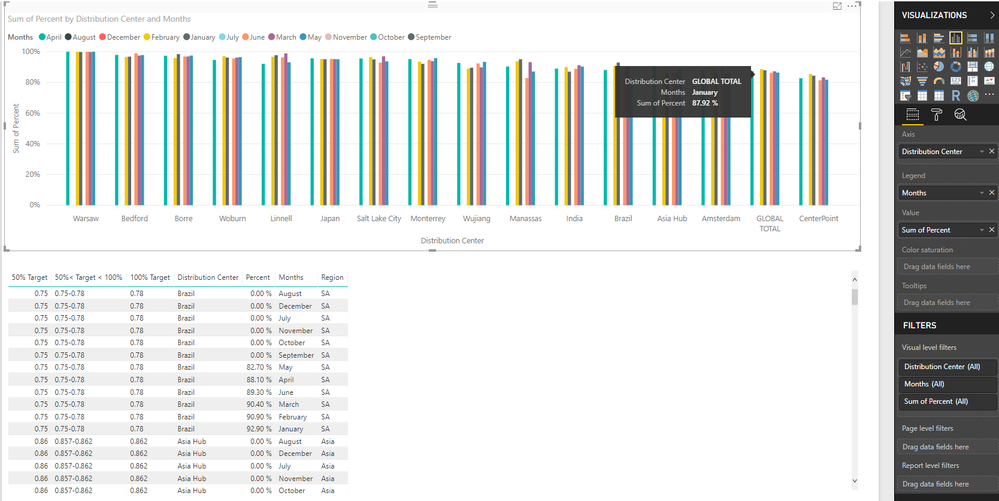
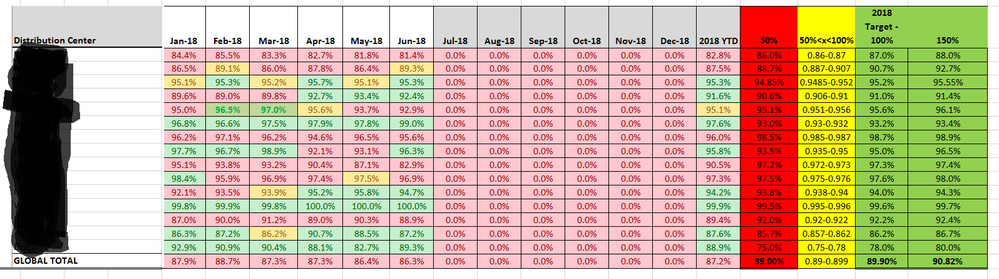
I want to color code my data given certain criteria. In my case I want to code based off of the following criteria. If percent is equal to or less than 50% color red, if percent is greater than 50% or less than 100% color yellow, and if percent is equal to or greater than 100% color green. The catch is each point on the x-axis, in this case the points represent different locations, have their own values for what is 50%, 50<100, and 100%. For example, 89% percent complete might only represent 50% percent efficeny which would result in a color code of red. I'm not sure if I have explained myself clearly, but I have attached the way my data looks in Power BI below in case that provides more clarity. I have also attached a excel table below. I want to color code a graph in power bi the way that table is color coded on a location by location basis.
Thanks,
David
Solved! Go to Solution.
@dbtornell,
There is no method to set the same formatting as that in Excel. However, you can check the workaournd in the attached PBIX file.
Regards,
Lydia
@dbtornell,
There is no method to set the same formatting as that in Excel. However, you can check the workaournd in the attached PBIX file.
Regards,
Lydia
The Power BI Data Visualization World Championships is back! Get ahead of the game and start preparing now!
| User | Count |
|---|---|
| 40 | |
| 37 | |
| 33 | |
| 29 | |
| 27 |
| User | Count |
|---|---|
| 133 | |
| 104 | |
| 61 | |
| 59 | |
| 55 |