
cancel
Showing results for 
Search instead for 
Did you mean: 

Get Fabric Certified for FREE during Fabric Data Days. Don't miss your chance! Request now

Reply
Anonymous
Not applicable

How to have the total reach value for distict source

1.png

I have a data file, that has two main columns: source and reach.

I want to know the total reach value for for all of the distict source. So basiclly, remove all the duplicate source, and only keep one record, and then calculate the total value.


how to do that?

1 ACCEPTED SOLUTION
Anonymous
Not applicable

I find the right solution now! 

SUMX(DISTINCT(expedia_top_us_sources_export[Source]), FIRSTNONBLANK(expedia_top_us_sources_export[Reach], 0))

View solution in original post

5 REPLIES 5
TomMartens
Super User
Super User

Hey,


basically it's not clear what you want:

  • remove all the "other" columns and then "remove duplicates" from within the Query Editor
  • a measure

Personally I would solve this by changing my data model, create a new table (Source) from within Power Query that references your data file, then remove all the other columns and all the duplicates, and then create a relationship between the new table (on the one side) and your data file (on the many side) using the column Source. This assumes, that there is 1 to 1 relationship between the columns Source and Reach.


Finally, delete the column "Reach" from your data file.


Hopefully this gives you an idea.


Regards,

Tom


Did I answer your question? Mark my post as a solution, this will help others!

Proud to be a Super User!
I accept Kudos 😉
Hamburg, Germany
Anonymous
Not applicable

I find the right solution now! 

SUMX(DISTINCT(expedia_top_us_sources_export[Source]), FIRSTNONBLANK(expedia_top_us_sources_export[Reach], 0))

Hey Robert,


additionally you also find this blog post interesting, it's about the differences between DISTINCT and VALUES:

http://sqlblog.com/blogs/marco_russo/archive/2011/03/08/difference-between-distinct-and-values-in-da...


Regards

Tom


Did I answer your question? Mark my post as a solution, this will help others!

Proud to be a Super User!
I accept Kudos 😉
Hamburg, Germany
Anonymous
Not applicable

accutually, i just use the power bi. I used to use the tableau, and tableau can use {INCLUDE [Source]: MAX([Reach])} to achieve the goal. For this expression, it will just look at the max reach for each source to remove the duplicate. So is there any function in power can have the same thing?  


Tried power query, all of my other graph will update for the new data. So it not work quite well for this case.


Thanks

Hey,


it's also possible to achieve the same in Power BI by creating a calculated column, here is the DAX statement:

MAX Source = 
CALCULATE(
    MAX('Table1'[Reach])
    ,ALLEXCEPT('Table1',Table1[Source])
) 

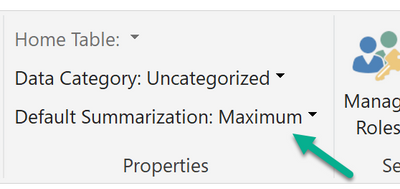
In addition to this you may also have to change the default summerization for the column, mark the new column and switch to the modeling menu:

image.png


In addition you also have to consider what your expected result is for the total of all sources.


Regards

Tom


Did I answer your question? Mark my post as a solution, this will help others!

Proud to be a Super User!
I accept Kudos 😉
Hamburg, Germany

Helpful resources

Announcements
November Power BI Update Carousel

Power BI Monthly Update - November 2025

Check out the November 2025 Power BI update to learn about new features.

Fabric Data Days Carousel

Fabric Data Days

Advance your Data & AI career with 50 days of live learning, contests, hands-on challenges, study groups & certifications and more!

FabCon Atlanta 2026 carousel

FabCon Atlanta 2026

Join us at FabCon Atlanta, March 16-20, for the ultimate Fabric, Power BI, AI and SQL community-led event. Save $200 with code FABCOMM.

Top Solution Authors
Top Kudoed Authors