This time we’re going bigger than ever. Fabric, Power BI, SQL, AI and more. We're covering it all. You won't want to miss it.
Learn moreDid you hear? There's a new SQL AI Developer certification (DP-800). Start preparing now and be one of the first to get certified. Register now
Hello,
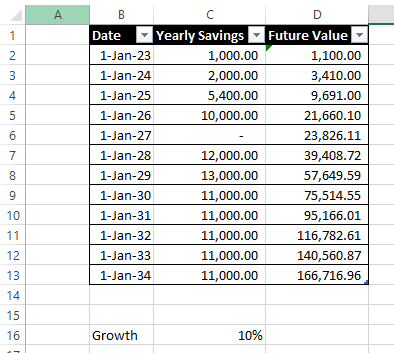
I would like to replicate this table in Excel below, but using Power BI.
and there is interest rate in cell C16.
In Excel, for Cell D2, the value would be: D2 =C2*(1+$C$16)
and for D3, it would be D3=(D2+C3)*(1+$C$16) and so on and so forth.
I tried using running total but the compounding effect is not calculated correctly, this is what I found in Power BI:
The Measure I created for FV3 is
FV3 = SUMX(FILTER(ALLSELECTED(Table3),Table3[Date]<=MAX(Table3[Date])),Table3[Yearly Savings])*(1+Interest[Interest Value])
Any help is appreciated, thank you in advance!
Solved! Go to Solution.
Hi,
You may download my PBI file from here.
Hope this helps.
Hi,
You may download my PBI file from here.
Hope this helps.
Thank you very much! I have been cracking my brain over this. I will go over your solution and learn from it before using it.
You are welcome.
@Ashish_Mathur great approach. Here is a slightly simpler version, but the idea is the same.
FV2 =
var y = max(Data[Date])
var a = SUMMARIZE(ALLSELECTED(Data),Data[Date],"comp",sum(Data[Yearly savings]),"pow",year(y)-year([Date])+1)
return sumx(filter(a,[pow]>0),[comp]*1.1^[pow])
Thank you @lbendlin for sharing your knowledge. It indeed is a much shorter formula than mine.
Power Query version:
let
Source = Table.FromRows(Json.Document(Binary.Decompress(Binary.FromText("Xc3LDQAhCEXRXli7eALOpxZj/20MmIkQlvcAYU5isFCjDoBW263WnHpYD42+/v0Dt8GJx6f5/HWQAIFDeii9AleQChqwPg==", BinaryEncoding.Base64), Compression.Deflate)), let _t = ((type nullable text) meta [Serialized.Text = true]) in type table [Year = _t, Savings = _t]),
#"Changed Type" = Table.TransformColumnTypes(Source,{{"Year", Int64.Type}, {"Savings", Currency.Type}}),
#"Added Index" = Table.AddIndexColumn(#"Changed Type", "Index", 0, 1, Int64.Type),
#"Added Custom" = Table.AddColumn(#"Added Index", "Future Value", each List.Accumulate({0..[Index]},0,(state,current)=>(state+#"Added Index"[Savings]{current})*1.1)),
#"Changed Type1" = Table.TransformColumnTypes(#"Added Custom",{{"Future Value", Currency.Type}})
in
#"Changed Type1"
Since you are adding data in each iteration you cannot do this calculation in DAX.
Check out the April 2026 Power BI update to learn about new features.
If you have recently started exploring Fabric, we'd love to hear how it's going. Your feedback can help with product improvements.
| User | Count |
|---|---|
| 37 | |
| 37 | |
| 31 | |
| 21 | |
| 16 |
| User | Count |
|---|---|
| 66 | |
| 56 | |
| 31 | |
| 26 | |
| 23 |