cancel
Showing results for 
Search instead for 
Did you mean: 

July 7 - July 17 | Round 2 of the Power BI Dataviz World Championships. Don't miss your chance! Learn more

Reply
Anonymous
Not applicable

Compounding Interest Table

Hello,


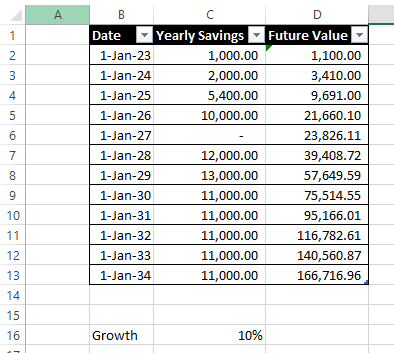
I would like to replicate this table in Excel below, but using Power BI.


shamsulramli_1-1675567741588.png


and there is interest rate in cell C16.


In Excel, for Cell D2, the value would be:  D2 =C2*(1+$C$16)

and for D3, it would be  D3=(D2+C3)*(1+$C$16) and so on and so forth.


I tried using running total but the compounding effect is not calculated correctly, this is what I found in Power BI:

shamsulramli_0-1675567478245.png


The Measure I created for FV3 is 


FV3 = SUMX(FILTER(ALLSELECTED(Table3),Table3[Date]<=MAX(Table3[Date])),Table3[Yearly Savings])*(1+Interest[Interest Value])


Any help is appreciated, thank you in advance!

1 ACCEPTED SOLUTION
Ashish_Mathur
Super User
Super User

Hi,

You may download my PBI file from here.

Hope this helps.

Untitled.png


Regards,
Ashish Mathur
http://www.ashishmathur.com
https://www.linkedin.com/in/excelenthusiasts/

View solution in original post

6 REPLIES 6
Ashish_Mathur
Super User
Super User

Hi,

You may download my PBI file from here.

Hope this helps.

Untitled.png


Regards,
Ashish Mathur
http://www.ashishmathur.com
https://www.linkedin.com/in/excelenthusiasts/
Anonymous
Not applicable

Thank you very much! I have been cracking my brain over this. I will go over your solution and learn from it before using it.

You are welcome.


Regards,
Ashish Mathur
http://www.ashishmathur.com
https://www.linkedin.com/in/excelenthusiasts/

@Ashish_Mathur great approach. Here is a slightly simpler version, but the idea is the same.


FV2 = 
var y = max(Data[Date])
var a = SUMMARIZE(ALLSELECTED(Data),Data[Date],"comp",sum(Data[Yearly savings]),"pow",year(y)-year([Date])+1)
return sumx(filter(a,[pow]>0),[comp]*1.1^[pow])


Thank you @lbendlin for sharing your knowledge.  It indeed is a much shorter formula than mine.


Regards,
Ashish Mathur
http://www.ashishmathur.com
https://www.linkedin.com/in/excelenthusiasts/
lbendlin
Super User
Super User

Power Query version:


let
    Source = Table.FromRows(Json.Document(Binary.Decompress(Binary.FromText("Xc3LDQAhCEXRXli7eALOpxZj/20MmIkQlvcAYU5isFCjDoBW263WnHpYD42+/v0Dt8GJx6f5/HWQAIFDeii9AleQChqwPg==", BinaryEncoding.Base64), Compression.Deflate)), let _t = ((type nullable text) meta [Serialized.Text = true]) in type table [Year = _t, Savings = _t]),
    #"Changed Type" = Table.TransformColumnTypes(Source,{{"Year", Int64.Type}, {"Savings", Currency.Type}}),
    #"Added Index" = Table.AddIndexColumn(#"Changed Type", "Index", 0, 1, Int64.Type),
    #"Added Custom" = Table.AddColumn(#"Added Index", "Future Value", each List.Accumulate({0..[Index]},0,(state,current)=>(state+#"Added Index"[Savings]{current})*1.1)),
    #"Changed Type1" = Table.TransformColumnTypes(#"Added Custom",{{"Future Value", Currency.Type}})
in
    #"Changed Type1"


Since you are adding data in each iteration you cannot do this calculation in DAX.

Helpful resources

Announcements
FabCon and SQLCon Barcelona 2026

FabCon & SQLCon – Barcelona 2026

Join us in Barcelona for FabCon and SQLCon, the Fabric, Power BI, SQL, and AI community event. Save €200 with code FABCMTY200.

60 days of Data Days Carousel

Data Days 2026

Join Fabric Data Days 2026: 60 days of free live/on-demand sessions, challenges, study groups, and certification opportunities.

Power BI DataViz World Championships carousel

Power BI DataViz World Championships - June 2026

A new Power BI DataViz World Championship is coming this June! Don't miss out on submitting your entry.