Don't miss your chance to take the Fabric Data Engineer (DP-600) exam for FREE! Find out how by watching the DP-600 session on-demand now through April 28th.
Learn moreJoin the FabCon + SQLCon recap series. Up next: Power BI, Real-Time Intelligence, IQ and AI, and Data Factory take center stage. All sessions are available on-demand after the live show. Register now
It seems that the "Conditional Formatting" option is only available for a value if it is aggregated (summarized).
Am I undertstanding correctly?
Is there any reason for this limitation?
thank you-
I found out, that if you use summarize when you format, then you can deselect summarize again after you have formatted.
Strange.... but for me it works.
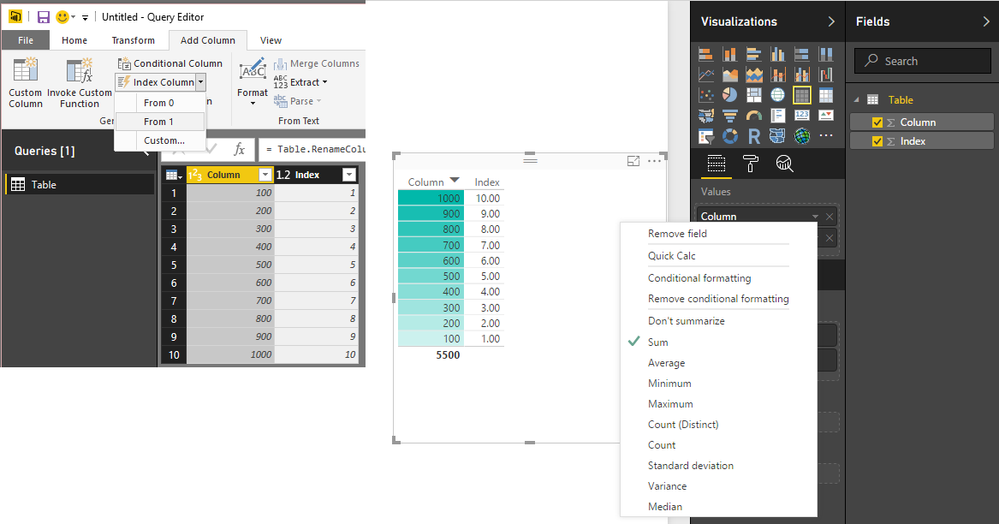
You can get around this by having an Index (or use another Column has a value at each row) and inlcude that Index in the Visual
Then the Values will not be really aggregated (although they'll default to SUM)
But the option will be available for Conditional Formatting
You need NO AGGREGATION at all, and conditional formatting based on Non-Numeric values, and preferably not a gradient assignment but rather assign colors to values instead. This is sorely missing from Power BI
Thanks, not sure why this is disallowed but that's a good workaround.
Check out the April 2026 Power BI update to learn about new features.
If you have recently started exploring Fabric, we'd love to hear how it's going. Your feedback can help with product improvements.
A new Power BI DataViz World Championship is coming this June! Don't miss out on submitting your entry.
| User | Count |
|---|---|
| 41 | |
| 37 | |
| 34 | |
| 21 | |
| 16 |
| User | Count |
|---|---|
| 65 | |
| 62 | |
| 31 | |
| 26 | |
| 25 |