Join us at FabCon Atlanta from March 16 - 20, 2026, for the ultimate Fabric, Power BI, AI and SQL community-led event. Save $200 with code FABCOMM.
Register now!The Power BI Data Visualization World Championships is back! Get ahead of the game and start preparing now! Learn more
It seems that the "Conditional Formatting" option is only available for a value if it is aggregated (summarized).
Am I undertstanding correctly?
Is there any reason for this limitation?
thank you-
I found out, that if you use summarize when you format, then you can deselect summarize again after you have formatted.
Strange.... but for me it works.
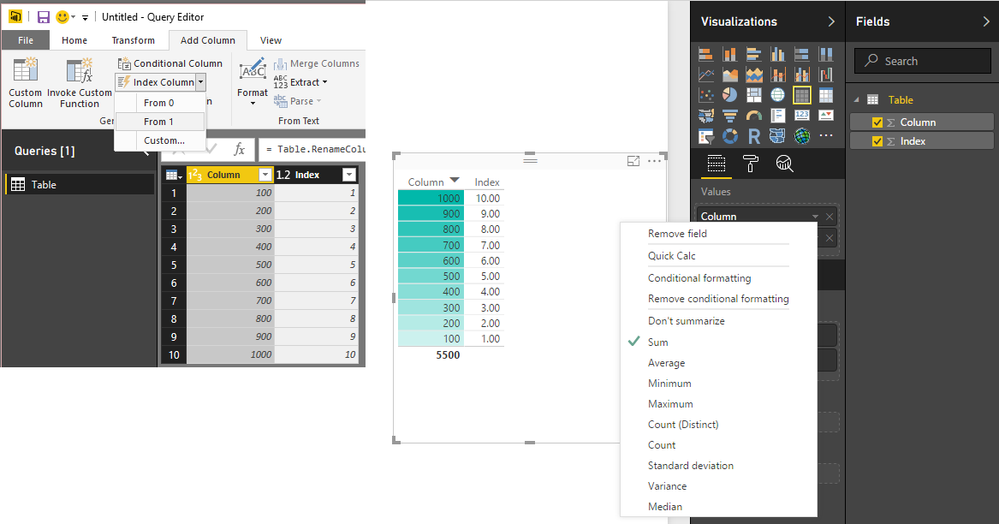
You can get around this by having an Index (or use another Column has a value at each row) and inlcude that Index in the Visual
Then the Values will not be really aggregated (although they'll default to SUM)
But the option will be available for Conditional Formatting
You need NO AGGREGATION at all, and conditional formatting based on Non-Numeric values, and preferably not a gradient assignment but rather assign colors to values instead. This is sorely missing from Power BI
Thanks, not sure why this is disallowed but that's a good workaround.
The Power BI Data Visualization World Championships is back! Get ahead of the game and start preparing now!
Check out the November 2025 Power BI update to learn about new features.
| User | Count |
|---|---|
| 65 | |
| 46 | |
| 43 | |
| 26 | |
| 19 |
| User | Count |
|---|---|
| 198 | |
| 126 | |
| 102 | |
| 68 | |
| 51 |