Get certified for free when you join Fabric Data Days 2026 and dive into Fabric, Power BI, SQL, AI, and other essential data skills.
Join nowJuly 7 - July 17 | Round 2 of the Power BI Dataviz World Championships. Don't miss your chance! Learn more
Hi,
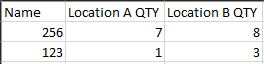
I think I am just brain dead today, but I think I am overlooking something super easy, but I have teh following table that I want to bring back into another table that just has an item number.
I want to grab for each Item and location the most recent Qty number. The out put would look like the following. I have a table that just has the Item (name) and nothing else. It should be a pretty easy calculated column I would imagine, but I just can't make it work right now.
Thanks,
Noel
Solved! Go to Solution.
I ended up using this formula.
Location A Qty= CALCULATE(SUM(table1[QTY]),FILTER(TAble1, table2[Location] = "A"),filter(table1', table1[item] = table2[name]),LASTDATE(table1[Date]))
I ended up using this formula.
Location A Qty= CALCULATE(SUM(table1[QTY]),FILTER(TAble1, table2[Location] = "A"),filter(table1', table1[item] = table2[name]),LASTDATE(table1[Date]))
Hi @NBOnecall ,
It seems that you have resolved the case. Can you please accept the helpful answer as a solution? If you have any questions, please feel free to ask us.
Due to other wanted results, I need it as a calculated column on the table, unforuntely not a measure.
Hey @NBOnecall
Make a copy of the first table. Remove all other columns except item. Then remove duplicates.
Next use the folllowing DAX formula for your calculated column:
Location A Quantity = CALCULATE(SUM(Table1[QTY]),FILTER(Table1, [Location] = "A" && Table1, Table1[Item] = Table2[Name] && Table1, MAX(Table1[Date])))
If this helps please kudo.
If this solves your problem please accept it as a solution.
@AnonymousIt states that too many arguments for the Filter statement. Am I missing something?
Join us in Barcelona for FabCon and SQLCon, the Fabric, Power BI, SQL, and AI community event. Save €200 with code FABCMTY200.
Join Fabric Data Days 2026: 60 days of free live/on-demand sessions, challenges, study groups, and certification opportunities.
| User | Count |
|---|---|
| 22 | |
| 22 | |
| 18 | |
| 16 | |
| 13 |
| User | Count |
|---|---|
| 63 | |
| 43 | |
| 40 | |
| 40 | |
| 40 |