cancel
Showing results for 
Search instead for 
Did you mean: 

Did you hear? There's a new SQL AI Developer certification (DP-800). Start preparing now and be one of the first to get certified. Register now

Reply
NBOnecall
Helper V
Helper V

Calculated Column Help with Most Recent Date

Hi,


I think I am just brain dead today, but I think I am overlooking something super easy, but I have teh following table that I want to bring back into another table that just has an item number.


TAble.png


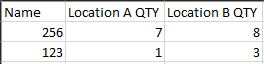
I want to grab for each Item and location the most recent Qty number. The out put would look like the following. I have a table that just has the Item (name) and nothing else. It should be a pretty easy calculated column I would imagine, but I just can't make it work right now.


Final.png

Thanks,

Noel

1 ACCEPTED SOLUTION
NBOnecall
Helper V
Helper V

I ended up using this formula.


Location A Qty= CALCULATE(SUM(table1[QTY]),FILTER(TAble1, table2[Location] = "A"),filter(table1', table1[item] = table2[name]),LASTDATE(table1[Date]))

View solution in original post

6 REPLIES 6
NBOnecall
Helper V
Helper V

I ended up using this formula.


Location A Qty= CALCULATE(SUM(table1[QTY]),FILTER(TAble1, table2[Location] = "A"),filter(table1', table1[item] = table2[name]),LASTDATE(table1[Date]))

Hi @NBOnecall ,

It seems that you have resolved the case. Can you please accept the helpful answer as a solution?  If you have any questions, please feel free to ask us.


Best Regards,
Xue Ding
If this post helps, then please consider Accept it as the solution to help the other members find it more quickly.
amitchandak
Super User
Super User

Try


Measure =LASTNONBLANKVALUE(table[Date], sum(Table[Qty]))


Put this in a matrix in row, location in column

Share with Power BI Enthusiasts: Full Power BI Video (20 Hours) YouTube
Microsoft Fabric Series 60+ Videos YouTube
Microsoft Fabric Hindi End to End YouTube

Due to other wanted results, I need it as a calculated column on the table, unforuntely not a measure.

Anonymous
Not applicable

Hey @NBOnecall 


Make a copy of the first table. Remove all other columns except item. Then remove duplicates.


Next use the folllowing DAX formula for your calculated column:


Location A Quantity = CALCULATE(SUM(Table1[QTY]),FILTER(Table1, [Location] = "A" && Table1, Table1[Item] = Table2[Name] && Table1, MAX(Table1[Date])))


If this helps please kudo.

If this solves your problem please accept it as a solution. 

@AnonymousIt states that too many arguments for the Filter statement. Am I missing something?

Helpful resources

Announcements
April Power BI Update Carousel

Power BI Monthly Update - April 2026

Check out the April 2026 Power BI update to learn about new features.

Fabric SQL PBI Data Days

Data Days 2026 coming soon!

Sign up to receive a private message when registration opens and key events begin.

New to Fabric survey Carousel

New to Fabric Survey

If you have recently started exploring Fabric, we'd love to hear how it's going. Your feedback can help with product improvements.

Power BI DataViz World Championships carousel

Power BI DataViz World Championships - June 2026

A new Power BI DataViz World Championship is coming this June! Don't miss out on submitting your entry.