Get certified for free when you join Fabric Data Days 2026 and dive into Fabric, Power BI, SQL, AI, and other essential data skills.
Join nowTry your skills in the Power BI Dataviz World Championship! Round one ends June 26. Join now
Hi,
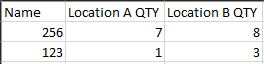
I think I am just brain dead today, but I think I am overlooking something super easy, but I have teh following table that I want to bring back into another table that just has an item number.
I want to grab for each Item and location the most recent Qty number. The out put would look like the following. I have a table that just has the Item (name) and nothing else. It should be a pretty easy calculated column I would imagine, but I just can't make it work right now.
Thanks,
Noel
Solved! Go to Solution.
I ended up using this formula.
Location A Qty= CALCULATE(SUM(table1[QTY]),FILTER(TAble1, table2[Location] = "A"),filter(table1', table1[item] = table2[name]),LASTDATE(table1[Date]))
I ended up using this formula.
Location A Qty= CALCULATE(SUM(table1[QTY]),FILTER(TAble1, table2[Location] = "A"),filter(table1', table1[item] = table2[name]),LASTDATE(table1[Date]))
Hi @NBOnecall ,
It seems that you have resolved the case. Can you please accept the helpful answer as a solution? If you have any questions, please feel free to ask us.
Due to other wanted results, I need it as a calculated column on the table, unforuntely not a measure.
Hey @NBOnecall
Make a copy of the first table. Remove all other columns except item. Then remove duplicates.
Next use the folllowing DAX formula for your calculated column:
Location A Quantity = CALCULATE(SUM(Table1[QTY]),FILTER(Table1, [Location] = "A" && Table1, Table1[Item] = Table2[Name] && Table1, MAX(Table1[Date])))
If this helps please kudo.
If this solves your problem please accept it as a solution.
@AnonymousIt states that too many arguments for the Filter statement. Am I missing something?
Don't miss out on Data Days, June 15 through August 7. Learn Fabric, Power BI, SQL, AI and more.
Check out the May 2026 Power BI update to learn about new features.
| User | Count |
|---|---|
| 24 | |
| 22 | |
| 22 | |
| 20 | |
| 12 |
| User | Count |
|---|---|
| 69 | |
| 56 | |
| 42 | |
| 40 | |
| 30 |