Join us at FabCon Atlanta from March 16 - 20, 2026, for the ultimate Fabric, Power BI, AI and SQL community-led event. Save $200 with code FABCOMM.
Register now!The Power BI Data Visualization World Championships is back! Get ahead of the game and start preparing now! Learn more
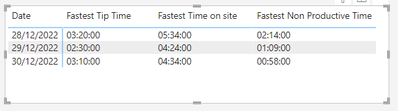
I am trying to gain an average 'tip time' of a lorry for last week and yesterday.
I can't seem to be able to select the average the usual way, i only have the option to select the 'fastest' and 'earliest'
Any ideas if there is a Dax code that could get an average time?
Many thanks
Lisa
Hi @lisaburton
Please try the following measure
=
VAR AverageSeconds =
AVERAGEX (
'Table',
VAR TipTime = 'Table'[Tip Time]
RETURN
3600 * HOUR ( TipTime )
+ 60 * MINUTE ( TipTime )
+ SECOND ( TipTime )
)
VAR Hours =
FORMAT ( QUOTIENT ( AverageSeconds, 3600 ), "00" )
VAR Minutes =
FORMAT ( QUOTIENT ( MOD ( AverageSeconds, 3600 ), 60 ), "00" )
VAR Seconds =
FORMAT ( MOD ( MOD ( AverageSeconds, 3600 ), 60 ), "00" )
RETURN
Hours & ":" & Minutes & ":" & Seconds
You can also simplify as you don't have "Seconds"
=
VAR AverageMinutes =
AVERAGEX (
'Table',
VAR TipTime = 'Table'[Tip Time]
RETURN
60 * HOUR ( TipTime )
+ MINUTE ( TipTime )
)
VAR Hours =
FORMAT ( QUOTIENT ( AverageMinutes, 60 ), "00" )
VAR Minutes =
FORMAT ( MOD ( AverageMinutes, 60 ), "00" )
RETURN
Hours & ":" & Minutes & ":" & "00"
Hi @lisaburton,
I would consider converting data type from time to duration.
Working with durations you can get an average as easy as usual.
If you need a tutorial on this topic, please let me know. Then I would upload one shortly.
Liked this post? More Content on:
https://www.youtube.com/channel/UC2lAgCgfyLCHsRv0h-ETBWQ
The Power BI Data Visualization World Championships is back! Get ahead of the game and start preparing now!
| User | Count |
|---|---|
| 19 | |
| 13 | |
| 9 | |
| 4 | |
| 4 |
| User | Count |
|---|---|
| 30 | |
| 26 | |
| 17 | |
| 11 | |
| 10 |