Join us at FabCon Atlanta from March 16 - 20, 2026, for the ultimate Fabric, Power BI, AI and SQL community-led event. Save $200 with code FABCOMM.
Register now!The Power BI Data Visualization World Championships is back! Get ahead of the game and start preparing now! Learn more
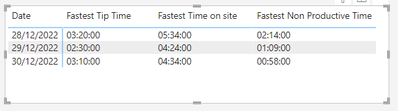
I am trying to gain an average 'tip time' of a lorry for last week and yesterday.
I can't seem to be able to select the average the usual way, i only have the option to select the 'fastest' and 'earliest'
Any ideas if there is a Dax code that could get an average time?
Many thanks
Lisa
Hi @lisaburton
Please try the following measure
=
VAR AverageSeconds =
AVERAGEX (
'Table',
VAR TipTime = 'Table'[Tip Time]
RETURN
3600 * HOUR ( TipTime )
+ 60 * MINUTE ( TipTime )
+ SECOND ( TipTime )
)
VAR Hours =
FORMAT ( QUOTIENT ( AverageSeconds, 3600 ), "00" )
VAR Minutes =
FORMAT ( QUOTIENT ( MOD ( AverageSeconds, 3600 ), 60 ), "00" )
VAR Seconds =
FORMAT ( MOD ( MOD ( AverageSeconds, 3600 ), 60 ), "00" )
RETURN
Hours & ":" & Minutes & ":" & Seconds
You can also simplify as you don't have "Seconds"
=
VAR AverageMinutes =
AVERAGEX (
'Table',
VAR TipTime = 'Table'[Tip Time]
RETURN
60 * HOUR ( TipTime )
+ MINUTE ( TipTime )
)
VAR Hours =
FORMAT ( QUOTIENT ( AverageMinutes, 60 ), "00" )
VAR Minutes =
FORMAT ( MOD ( AverageMinutes, 60 ), "00" )
RETURN
Hours & ":" & Minutes & ":" & "00"
Hi @lisaburton,
I would consider converting data type from time to duration.
Working with durations you can get an average as easy as usual.
If you need a tutorial on this topic, please let me know. Then I would upload one shortly.
Liked this post? More Content on:
https://www.youtube.com/channel/UC2lAgCgfyLCHsRv0h-ETBWQ
The Power BI Data Visualization World Championships is back! Get ahead of the game and start preparing now!
Check out the November 2025 Power BI update to learn about new features.
| User | Count |
|---|---|
| 19 | |
| 10 | |
| 9 | |
| 4 | |
| 4 |
| User | Count |
|---|---|
| 34 | |
| 32 | |
| 20 | |
| 12 | |
| 11 |