cancel
Showing results for 
Search instead for 
Did you mean: 

We've captured the moments from FabCon & SQLCon that everyone is talking about, and we are bringing them to the community, live and on-demand. Starts on April 14th. Register now

Reply
lisaburton
Frequent Visitor

average time function

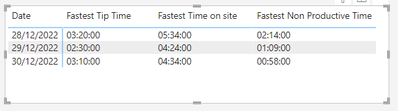
I am trying to gain an average 'tip time' of a lorry for last week and yesterday.

I can't seem to be able to select the average the usual way, i only have the option to select the 'fastest' and 'earliest'

lisaburton_0-1672915324546.png

Any ideas if there is a Dax code that could get an average time?


Many thanks 

Lisa 


3 REPLIES 3
Anonymous
Not applicable

In PowerQuery, Duplicate the time column and convert the data type to Decimal.
Let's say your new column is "TimeFieldinDecimal"
 
DAX:
Avg Time (Time) =

var _duration = Avg(TimeFieldinDecimal)
var _hrs = _duration * 24
var _mins =  (_hrs - int(_hrs)) * 60
var _sec =  (_mins - int(_mins)) * 60

return FORMAT(int(_hrs), "#00") & ":" & FORMAT(int(_mins), "#00") & ":" & FORMAT(int(_sec), "#00")
tamerj1
Community Champion
Community Champion

Hi @lisaburton 
Please try the following measure


=
VAR AverageSeconds =
    AVERAGEX (
        'Table',
        VAR TipTime = 'Table'[Tip Time]
        RETURN
            3600 * HOUR ( TipTime )
                + 60 * MINUTE ( TipTime )
                + SECOND ( TipTime )
    )
VAR Hours =
    FORMAT ( QUOTIENT ( AverageSeconds, 3600 ), "00" )
VAR Minutes =
    FORMAT ( QUOTIENT ( MOD ( AverageSeconds, 3600 ), 60 ), "00" )
VAR Seconds =
    FORMAT ( MOD ( MOD ( AverageSeconds, 3600 ), 60 ), "00" )
RETURN
    Hours & ":" & Minutes & ":" & Seconds

You can also simplify as you don't have "Seconds"

=
VAR AverageMinutes =
    AVERAGEX (
        'Table',
        VAR TipTime = 'Table'[Tip Time]
        RETURN
            60 * HOUR ( TipTime )
                + MINUTE ( TipTime )
    )
VAR Hours =
    FORMAT ( QUOTIENT ( AverageMinutes, 60 ), "00" )
VAR Minutes =
    FORMAT ( MOD ( AverageMinutes, 60 ), "00" )
RETURN
    Hours & ":" & Minutes & ":" & "00"


TOK
Helper II
Helper II

Hi @lisaburton,
I would consider converting data type from time to duration.
Working with durations you can get an average as easy as usual.

If you need a tutorial on this topic, please let me know. Then I would upload one shortly.

Liked this post? More Content on:
https://www.youtube.com/channel/UC2lAgCgfyLCHsRv0h-ETBWQ

Helpful resources

Announcements
New to Fabric survey Carousel

New to Fabric Survey

If you have recently started exploring Fabric, we'd love to hear how it's going. Your feedback can help with product improvements.

Power BI DataViz World Championships carousel

Power BI DataViz World Championships - June 2026

A new Power BI DataViz World Championship is coming this June! Don't miss out on submitting your entry.

Join our Fabric User Panel

Join our Fabric User Panel

Share feedback directly with Fabric product managers, participate in targeted research studies and influence the Fabric roadmap.

March Power BI Update Carousel

Power BI Community Update - March 2026

Check out the March 2026 Power BI update to learn about new features.