Don't miss your chance to take the Fabric Data Engineer (DP-600) exam for FREE! Find out how by attending the DP-600 session on April 23rd (pacific time), live or on-demand.
Learn moreJoin the FabCon + SQLCon recap series. Up next: Power BI, Real-Time Intelligence, IQ and AI, and Data Factory take center stage. All sessions are available on-demand after the live show. Register now
Jolly Day,
I am needing to exclude three users from being included in the ranking. What I currently have just inserts a dash where there ranking number would be and are still being ranked. Could someone help me with a measure to completely exclude them?
Many thanks in advance!
Solved! Go to Solution.
Hi,
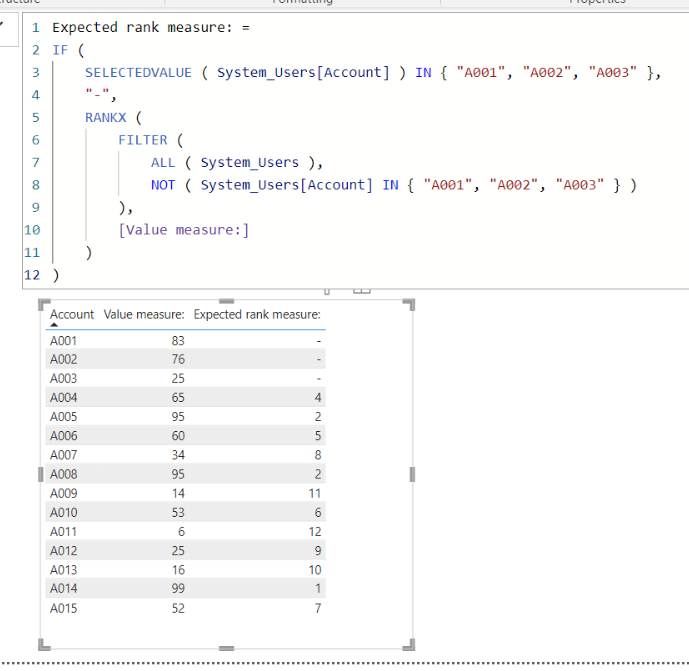
I tried to create a sample pbix file like below.
I hope the below can provide some ideas on how to create a solution for your datamodel.
Expected rank measure: =
IF (
SELECTEDVALUE ( System_Users[Account] ) IN { "A001", "A002", "A003" },
"-",
RANKX (
FILTER (
ALL ( System_Users ),
NOT ( System_Users[Account] IN { "A001", "A002", "A003" } )
),
[Value measure:]
)
)
That was perfecft! Thank you very much!
Hi,
I tried to create a sample pbix file like below.
I hope the below can provide some ideas on how to create a solution for your datamodel.
Expected rank measure: =
IF (
SELECTEDVALUE ( System_Users[Account] ) IN { "A001", "A002", "A003" },
"-",
RANKX (
FILTER (
ALL ( System_Users ),
NOT ( System_Users[Account] IN { "A001", "A002", "A003" } )
),
[Value measure:]
)
)
Check out the April 2026 Power BI update to learn about new features.
If you have recently started exploring Fabric, we'd love to hear how it's going. Your feedback can help with product improvements.
A new Power BI DataViz World Championship is coming this June! Don't miss out on submitting your entry.
| User | Count |
|---|---|
| 6 | |
| 6 | |
| 3 | |
| 2 | |
| 2 |
| User | Count |
|---|---|
| 22 | |
| 10 | |
| 10 | |
| 7 | |
| 5 |