This time we’re going bigger than ever. Fabric, Power BI, SQL, AI and more. We're covering it all. You won't want to miss it.
Learn moreDid you hear? There's a new SQL AI Developer certification (DP-800). Start preparing now and be one of the first to get certified. Register now
Jolly Day,
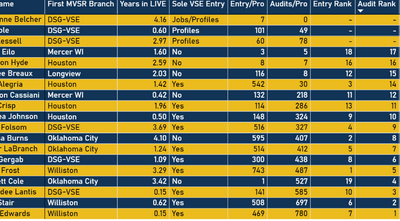
I am needing to exclude three users from being included in the ranking. What I currently have just inserts a dash where there ranking number would be and are still being ranked. Could someone help me with a measure to completely exclude them?
Many thanks in advance!
Solved! Go to Solution.
Hi,
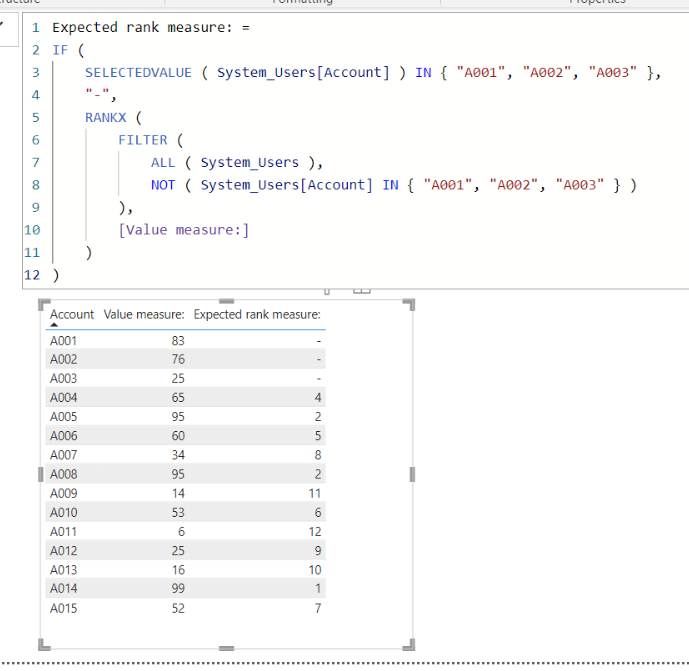
I tried to create a sample pbix file like below.
I hope the below can provide some ideas on how to create a solution for your datamodel.
Expected rank measure: =
IF (
SELECTEDVALUE ( System_Users[Account] ) IN { "A001", "A002", "A003" },
"-",
RANKX (
FILTER (
ALL ( System_Users ),
NOT ( System_Users[Account] IN { "A001", "A002", "A003" } )
),
[Value measure:]
)
)
That was perfecft! Thank you very much!
Hi,
I tried to create a sample pbix file like below.
I hope the below can provide some ideas on how to create a solution for your datamodel.
Expected rank measure: =
IF (
SELECTEDVALUE ( System_Users[Account] ) IN { "A001", "A002", "A003" },
"-",
RANKX (
FILTER (
ALL ( System_Users ),
NOT ( System_Users[Account] IN { "A001", "A002", "A003" } )
),
[Value measure:]
)
)
Check out the April 2026 Power BI update to learn about new features.
Sign up to receive a private message when registration opens and key events begin.
If you have recently started exploring Fabric, we'd love to hear how it's going. Your feedback can help with product improvements.
| User | Count |
|---|---|
| 6 | |
| 5 | |
| 5 | |
| 3 | |
| 1 |
| User | Count |
|---|---|
| 14 | |
| 8 | |
| 6 | |
| 6 | |
| 5 |