Join us at FabCon Atlanta from March 16 - 20, 2026, for the ultimate Fabric, Power BI, AI and SQL community-led event. Save $200 with code FABCOMM.
Register now!The Power BI Data Visualization World Championships is back! Get ahead of the game and start preparing now! Learn more
Jolly Day,
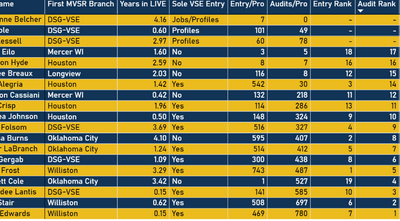
I am needing to exclude three users from being included in the ranking. What I currently have just inserts a dash where there ranking number would be and are still being ranked. Could someone help me with a measure to completely exclude them?
Many thanks in advance!
Solved! Go to Solution.
Hi,
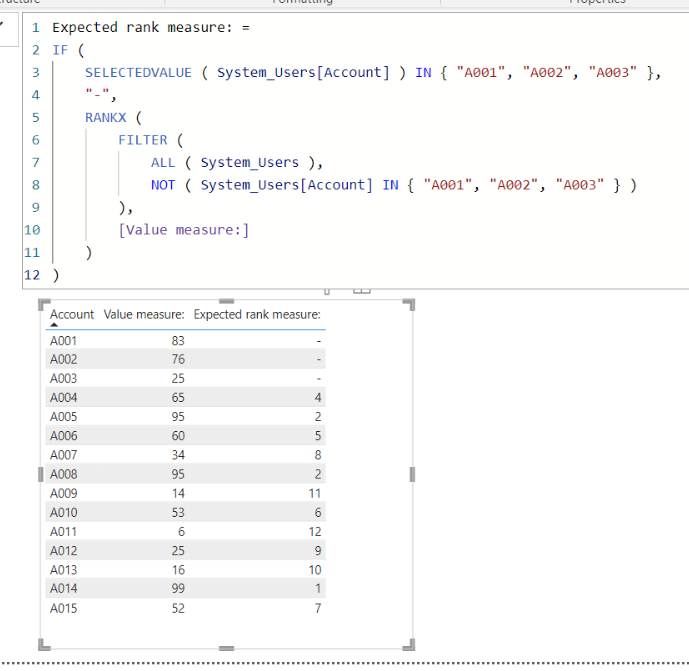
I tried to create a sample pbix file like below.
I hope the below can provide some ideas on how to create a solution for your datamodel.
Expected rank measure: =
IF (
SELECTEDVALUE ( System_Users[Account] ) IN { "A001", "A002", "A003" },
"-",
RANKX (
FILTER (
ALL ( System_Users ),
NOT ( System_Users[Account] IN { "A001", "A002", "A003" } )
),
[Value measure:]
)
)
That was perfecft! Thank you very much!
Hi,
I tried to create a sample pbix file like below.
I hope the below can provide some ideas on how to create a solution for your datamodel.
Expected rank measure: =
IF (
SELECTEDVALUE ( System_Users[Account] ) IN { "A001", "A002", "A003" },
"-",
RANKX (
FILTER (
ALL ( System_Users ),
NOT ( System_Users[Account] IN { "A001", "A002", "A003" } )
),
[Value measure:]
)
)
The Power BI Data Visualization World Championships is back! Get ahead of the game and start preparing now!
| User | Count |
|---|---|
| 19 | |
| 14 | |
| 7 | |
| 5 | |
| 5 |
| User | Count |
|---|---|
| 27 | |
| 18 | |
| 17 | |
| 11 | |
| 10 |