Share feedback directly with Fabric product managers, Participate in targeted research studies and influence the Fabric roadmap.
Sign up nowVote for your favorite vizzies from the Power BI Dataviz World Championship submissions. Vote now!
Hello,
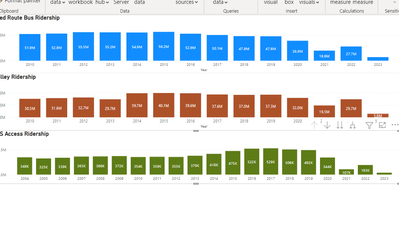
I have 3 visuals I created on a report, they use different measures and filters for each.
Is there a way I can get add them up to get a grand total?
For example: Sum from all 3 of these charts.
ex) All added up into one ending bar chart for a grand total.
Solved! Go to Solution.
@amandabus21 Couple potential ways to do it, just add the filters you have in the other visuals to the final visual. If there are conflicts, you can do things like:
Measure = CALCULATE([Measure 1], [Vehicle] = "Bus") + CALCULATE([Measure 2], [Vehicle = "Car") + [Measure 3]
@amandabus21 Measure = [Measure 1] + [Measure 2] + [Measure 3] ? A Stacked Clustered Column Chart?
Hi Greg @Greg_Deckler
Yes that would work, but the graphs are filtered and I would need to the filters need to be added in.
For example the First one has a filter where it only includes "Bus" . I need that filter to be in there when caculating the total.
@amandabus21 Couple potential ways to do it, just add the filters you have in the other visuals to the final visual. If there are conflicts, you can do things like:
Measure = CALCULATE([Measure 1], [Vehicle] = "Bus") + CALCULATE([Measure 2], [Vehicle = "Car") + [Measure 3]
If you love stickers, then you will definitely want to check out our Community Sticker Challenge!
Check out the January 2026 Power BI update to learn about new features.
| User | Count |
|---|---|
| 7 | |
| 4 | |
| 4 | |
| 3 | |
| 2 |
| User | Count |
|---|---|
| 15 | |
| 9 | |
| 8 | |
| 7 | |
| 5 |