cancel
Showing results for 
Search instead for 
Did you mean: 

July 7 - July 17 | Round 2 of the Power BI Dataviz World Championships. Don't miss your chance! Learn more

Reply
amandabus21
Helper V
Helper V

Adding Values

Hello,


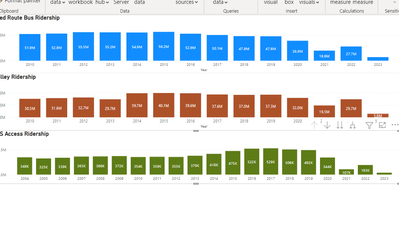
I have 3 visuals I created on a report, they use different measures and filters for each. 


Is there a way I can get add them up to get a grand total?


For example: Sum from all 3 of these charts. 

ex) All added up into one ending bar chart for a grand total.


amandabus21_0-1665164326866.png


2 ACCEPTED SOLUTIONS

@amandabus21 Couple potential ways to do it, just add the filters you have in the other visuals to the final visual. If there are conflicts, you can do things like:

Measure = CALCULATE([Measure 1], [Vehicle] = "Bus") + CALCULATE([Measure 2], [Vehicle = "Car") + [Measure 3]


Follow on LinkedIn
@ me in replies or I'll lose your thread!!!
Instead of a Kudo, please vote for this idea
Become an expert!: Enterprise DNA
External Tools: MSHGQM
YouTube Channel!: Microsoft Hates Greg
Latest book!:
DAX For Humans

DAX is easy, CALCULATE makes DAX hard...

View solution in original post

Re-adding the filters worked, thank you so much! 🙂 @Greg_Deckler 

View solution in original post

4 REPLIES 4
Greg_Deckler
Community Champion
Community Champion

@amandabus21 Measure = [Measure 1] + [Measure 2] + [Measure 3] ? A Stacked Clustered Column Chart?


Follow on LinkedIn
@ me in replies or I'll lose your thread!!!
Instead of a Kudo, please vote for this idea
Become an expert!: Enterprise DNA
External Tools: MSHGQM
YouTube Channel!: Microsoft Hates Greg
Latest book!:
DAX For Humans

DAX is easy, CALCULATE makes DAX hard...

Hi Greg @Greg_Deckler 


Yes that would work, but the graphs are filtered and I would need to the filters need to be added in. 


For example the First one has a filter where it only includes "Bus" . I need that filter to be in there when caculating the total.

@amandabus21 Couple potential ways to do it, just add the filters you have in the other visuals to the final visual. If there are conflicts, you can do things like:

Measure = CALCULATE([Measure 1], [Vehicle] = "Bus") + CALCULATE([Measure 2], [Vehicle = "Car") + [Measure 3]


Follow on LinkedIn
@ me in replies or I'll lose your thread!!!
Instead of a Kudo, please vote for this idea
Become an expert!: Enterprise DNA
External Tools: MSHGQM
YouTube Channel!: Microsoft Hates Greg
Latest book!:
DAX For Humans

DAX is easy, CALCULATE makes DAX hard...

Re-adding the filters worked, thank you so much! 🙂 @Greg_Deckler 

Helpful resources

Announcements
FabCon and SQLCon Barcelona 2026

FabCon & SQLCon – Barcelona 2026

Join us in Barcelona for FabCon and SQLCon, the Fabric, Power BI, SQL, and AI community event. Save €200 with code FABCMTY200.

60 days of Data Days Carousel

Data Days 2026

Join Fabric Data Days 2026: 60 days of free live/on-demand sessions, challenges, study groups, and certification opportunities.

Power BI DataViz World Championships carousel

Power BI DataViz World Championships - June 2026

A new Power BI DataViz World Championship is coming this June! Don't miss out on submitting your entry.