Don't miss your chance to take the Fabric Data Engineer (DP-600) exam for FREE! Find out how by attending the DP-600 session on April 23rd (pacific time), live or on-demand.
Learn moreNext up in the FabCon + SQLCon recap series: The roadmap for Microsoft SQL and Maximizing Developer experiences in Fabric. All sessions are available on-demand after the live show. Register now
Hello,
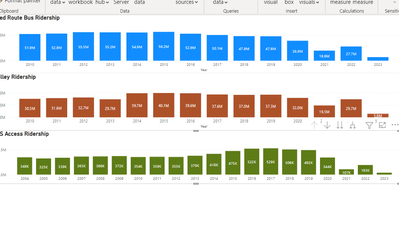
I have 3 visuals I created on a report, they use different measures and filters for each.
Is there a way I can get add them up to get a grand total?
For example: Sum from all 3 of these charts.
ex) All added up into one ending bar chart for a grand total.
Solved! Go to Solution.
@amandabus21 Couple potential ways to do it, just add the filters you have in the other visuals to the final visual. If there are conflicts, you can do things like:
Measure = CALCULATE([Measure 1], [Vehicle] = "Bus") + CALCULATE([Measure 2], [Vehicle = "Car") + [Measure 3]
@amandabus21 Measure = [Measure 1] + [Measure 2] + [Measure 3] ? A Stacked Clustered Column Chart?
Hi Greg @Greg_Deckler
Yes that would work, but the graphs are filtered and I would need to the filters need to be added in.
For example the First one has a filter where it only includes "Bus" . I need that filter to be in there when caculating the total.
@amandabus21 Couple potential ways to do it, just add the filters you have in the other visuals to the final visual. If there are conflicts, you can do things like:
Measure = CALCULATE([Measure 1], [Vehicle] = "Bus") + CALCULATE([Measure 2], [Vehicle = "Car") + [Measure 3]
If you have recently started exploring Fabric, we'd love to hear how it's going. Your feedback can help with product improvements.
A new Power BI DataViz World Championship is coming this June! Don't miss out on submitting your entry.
| User | Count |
|---|---|
| 6 | |
| 6 | |
| 3 | |
| 2 | |
| 2 |
| User | Count |
|---|---|
| 21 | |
| 10 | |
| 10 | |
| 5 | |
| 5 |