cancel
Showing results for 
Search instead for 
Did you mean: 

Data Days is here! Join us now for 60+ days of learning, challenges, and connection. Learn more

Reply
amandabus21
Helper V
Helper V

Adding Values

Hello,


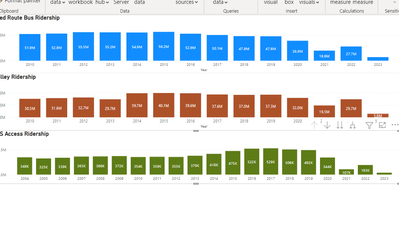
I have 3 visuals I created on a report, they use different measures and filters for each. 


Is there a way I can get add them up to get a grand total?


For example: Sum from all 3 of these charts. 

ex) All added up into one ending bar chart for a grand total.


amandabus21_0-1665164326866.png


2 ACCEPTED SOLUTIONS

@amandabus21 Couple potential ways to do it, just add the filters you have in the other visuals to the final visual. If there are conflicts, you can do things like:

Measure = CALCULATE([Measure 1], [Vehicle] = "Bus") + CALCULATE([Measure 2], [Vehicle = "Car") + [Measure 3]


Follow on LinkedIn
@ me in replies or I'll lose your thread!!!
Instead of a Kudo, please vote for this idea
Become an expert!: Enterprise DNA
External Tools: MSHGQM
YouTube Channel!: Microsoft Hates Greg
Latest book!:
DAX For Humans

DAX is easy, CALCULATE makes DAX hard...

View solution in original post

Re-adding the filters worked, thank you so much! 🙂 @Greg_Deckler 

View solution in original post

4 REPLIES 4
Greg_Deckler
Community Champion
Community Champion

@amandabus21 Measure = [Measure 1] + [Measure 2] + [Measure 3] ? A Stacked Clustered Column Chart?


Follow on LinkedIn
@ me in replies or I'll lose your thread!!!
Instead of a Kudo, please vote for this idea
Become an expert!: Enterprise DNA
External Tools: MSHGQM
YouTube Channel!: Microsoft Hates Greg
Latest book!:
DAX For Humans

DAX is easy, CALCULATE makes DAX hard...

Hi Greg @Greg_Deckler 


Yes that would work, but the graphs are filtered and I would need to the filters need to be added in. 


For example the First one has a filter where it only includes "Bus" . I need that filter to be in there when caculating the total.

@amandabus21 Couple potential ways to do it, just add the filters you have in the other visuals to the final visual. If there are conflicts, you can do things like:

Measure = CALCULATE([Measure 1], [Vehicle] = "Bus") + CALCULATE([Measure 2], [Vehicle = "Car") + [Measure 3]


Follow on LinkedIn
@ me in replies or I'll lose your thread!!!
Instead of a Kudo, please vote for this idea
Become an expert!: Enterprise DNA
External Tools: MSHGQM
YouTube Channel!: Microsoft Hates Greg
Latest book!:
DAX For Humans

DAX is easy, CALCULATE makes DAX hard...

Re-adding the filters worked, thank you so much! 🙂 @Greg_Deckler 

Helpful resources

Announcements
Fabric Data Days is here Carousel

Fabric Data Days 2026

Don't miss out on Data Days, June 15 through August 7. Learn Fabric, Power BI, SQL, AI and more.

May Power BI Update Carousel

Power BI Monthly Update - May 2026

Check out the May 2026 Power BI update to learn about new features.

Power BI DataViz World Championships carousel

Power BI DataViz World Championships - June 2026

A new Power BI DataViz World Championship is coming this June! Don't miss out on submitting your entry.