Get certified for free when you join Fabric Data Days 2026 and dive into Fabric, Power BI, SQL, AI, and other essential data skills.
Join nowData Days is here! Join us now for 60+ days of learning, challenges, and connection. Learn more
Hi Folks.
We have a Logstash service with which we monitor, a folder, and push CSV files onto kibana/search.
The csv files, source folders, are on a Linux box.
Help: How can we replace the above setup with PBI?
Solved! Go to Solution.
Hi @aherabit ,
To establish a connection between Elasticsearch and Power BI, you need to install and configure the ODBC driver. Follow these steps to configure your DSN:
1.Go to your administrative tools and select your ODBC driver.
2.In the panel, select “System DSN” and click “Add..”.
3.Click on “Elasticsearch Driver” and “Finish”
.....
Then you can connect Elasticsearch to Power BI.
For more details, you can read related document:
Connect Elasticsearch to Power BI: An Easy Guide (hevodata.com)
If the problem is still not resolved, please provide detailed error information and let me know immediately. Looking forward to your reply.
Best Regards,
Henry
If this post helps, then please consider Accept it as the solution to help the other members find it more quickly.
Hi @aherabit ,
You can use the Elasticsearch ODBC driver to access Elasticsearch data from Microsoft Power BI Desktop.
Microsoft Power BI Desktop | Elasticsearch Guide [7.14] | Elastic
or enter base URL for the Search API in Web entry of Power BI Desktop. For more details, please check the following articles:
Search API | Elasticsearch Guide [7.14] | Elastic
If the problem is still not resolved, please provide detailed error information and related screenshoot. Looking forward to your reply.
Best Regards,
Henry
If this post helps, then please consider Accept it as the solution to help the other members find it more quickly.
Thanks, Henry.
I don't have ODBC for Elasticsearch as the article stating. Any idea?available DSN
Also, the available ODBC driver is available on Windows but my Elasticsearch is running on Ubuntu.
Hi @aherabit ,
To establish a connection between Elasticsearch and Power BI, you need to install and configure the ODBC driver. Follow these steps to configure your DSN:
1.Go to your administrative tools and select your ODBC driver.
2.In the panel, select “System DSN” and click “Add..”.
3.Click on “Elasticsearch Driver” and “Finish”
.....
Then you can connect Elasticsearch to Power BI.
For more details, you can read related document:
Connect Elasticsearch to Power BI: An Easy Guide (hevodata.com)
If the problem is still not resolved, please provide detailed error information and let me know immediately. Looking forward to your reply.
Best Regards,
Henry
If this post helps, then please consider Accept it as the solution to help the other members find it more quickly.
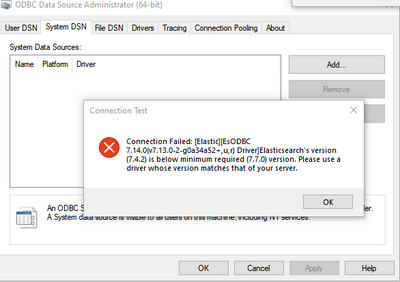
The current drivers, from Elastic, is not comptible... (requirs upgrades)
Any idea: how to add the connection through 'Web' option?
The connection is reaching but need to pass specific index info.
Don't miss out on Data Days, June 15 through August 7. Learn Fabric, Power BI, SQL, AI and more.
Check out the May 2026 Power BI update to learn about new features.
| User | Count |
|---|---|
| 16 | |
| 10 | |
| 10 | |
| 8 | |
| 7 |
| User | Count |
|---|---|
| 40 | |
| 36 | |
| 35 | |
| 29 | |
| 20 |