Don't miss your chance to take the Fabric Data Engineer (DP-700) exam on us!
Learn moreWe've captured the moments from FabCon & SQLCon that everyone is talking about, and we are bringing them to the community, live and on-demand. Starts on April 14th. Register now
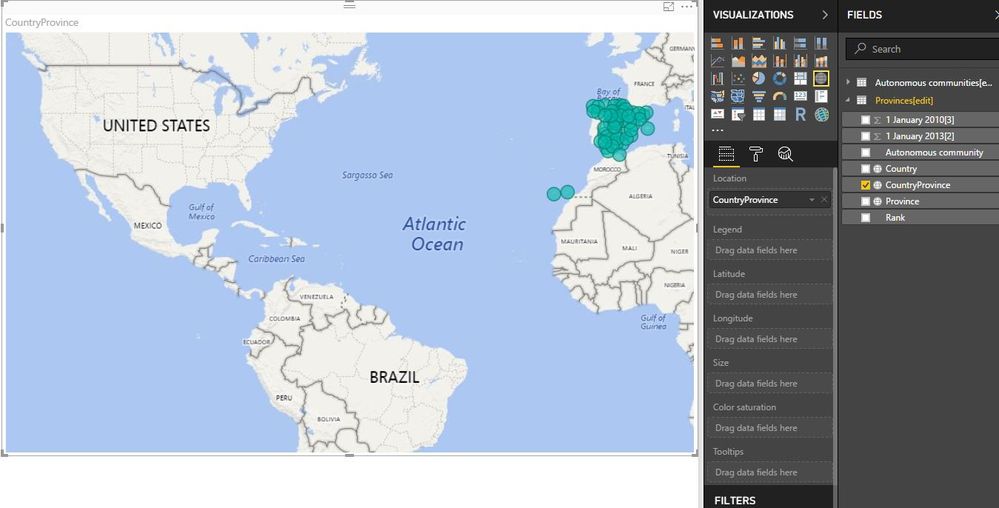
Hello, I have a problem. On having showed a map of Spain with information for provinces, there are provinces that me appear in america. I have put a filter in " visual level filters " with country: Spain and categorized as country, but it is not solved. Can someone help me? Thank you
Solved! Go to Solution.
Hi @lbarreiro,
There are two easy ways to make it right.
1. Add a new Calculated column "Country province". Pay attention to the space following "Spain".
Change its "Data Category" to "Place".
CountryProvince = CONCATENATE ( "Spain ", [Province] )
2. Add a Calculated column "Spain".
Chang its "Data Category" to Country.
Best Regards!
Dale
Hi @lbarreiro,
There are two easy ways to make it right.
1. Add a new Calculated column "Country province". Pay attention to the space following "Spain".
Change its "Data Category" to "Place".
CountryProvince = CONCATENATE ( "Spain ", [Province] )
2. Add a Calculated column "Spain".
Chang its "Data Category" to Country.
Best Regards!
Dale
Thank you! I could made it.
If you have recently started exploring Fabric, we'd love to hear how it's going. Your feedback can help with product improvements.
A new Power BI DataViz World Championship is coming this June! Don't miss out on submitting your entry.
Share feedback directly with Fabric product managers, participate in targeted research studies and influence the Fabric roadmap.
| User | Count |
|---|---|
| 29 | |
| 23 | |
| 18 | |
| 17 | |
| 14 |