Join us at FabCon Atlanta from March 16 - 20, 2026, for the ultimate Fabric, Power BI, AI and SQL community-led event. Save $200 with code FABCOMM.
Register now!The Power BI Data Visualization World Championships is back! Get ahead of the game and start preparing now! Learn more
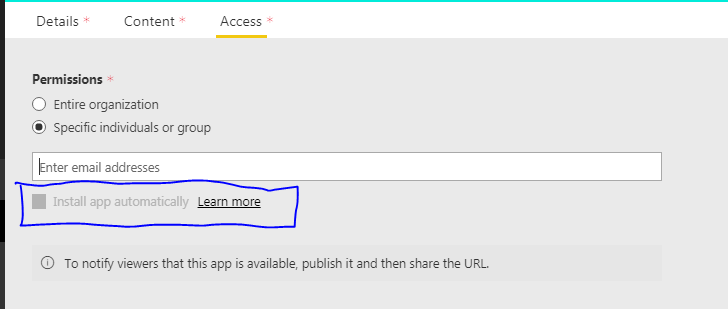
When I publish an app from an app workspace on the Access tab I don't have the possibilty to "Install app automatically" for the recipients.
If I look at https://docs.microsoft.com/en-us/power-bi/service-create-distribute-apps#publish-your-app it should be possible:
Solved! Go to Solution.
Hi @Knud,
Based on test, I found only internal account(MSIT) have this option.
When i test on other tenant accounts, I can't find this option even if they have admin/owner permissions of current app workspace.
In my opinion, I think this feature may not been released.
Regards,
Xiaoxin Sheng
Hi @Knud,
Based on test, I found only internal account(MSIT) have this option.
When i test on other tenant accounts, I can't find this option even if they have admin/owner permissions of current app workspace.
In my opinion, I think this feature may not been released.
Regards,
Xiaoxin Sheng
Hi @Knud and @Anonymous,
I'm not sure if I am facing the exact same problem, because what I can find in the documentation is the following:
Once the admin has enabled the feature, the app publishers have a new option available to install the app automatically.
This makes sense, as I can see the feature, but it is greyed out. But we can not find out where the admin should enable this. Do you have any clue/did you find a solution yet?
This functionality is now general available.
Indeed it is a tenant setting:
For more information https://powerbi.microsoft.com/en-us/blog/automatically-install-apps/
Thanks so much @Knud, this was exactly where I was looking for! I am able to publish automatically. 🙂
The Power BI Data Visualization World Championships is back! Get ahead of the game and start preparing now!