Don't miss your chance to take the Fabric Data Engineer (DP-600) exam for FREE! Find out how by attending the DP-600 session on April 23rd (pacific time), live or on-demand.
Learn moreNext up in the FabCon + SQLCon recap series: The roadmap for Microsoft SQL and Maximizing Developer experiences in Fabric. All sessions are available on-demand after the live show. Register now
Goodafternoon,
Hopefully somebody can help me with a error.
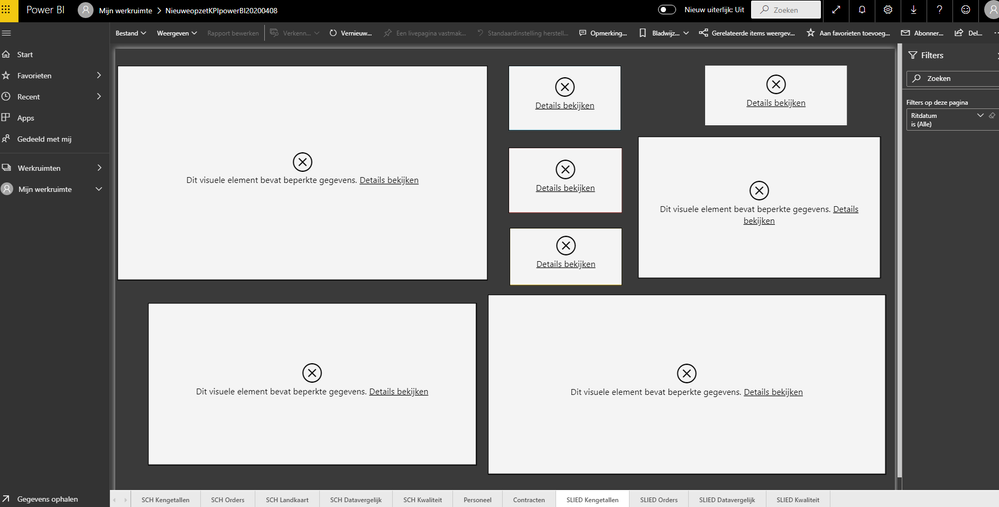
When a share a report to my colleagues they get this errors:
The error is in English: "This visual contains limited data"
I don't understand what the cause is of this error.
Is there somebody how knows the solution?
Solved! Go to Solution.
Go to the RLS (Row-Level Security) settings, elect every member of the group and enter their emails again. Click on Add and then Save.
@wanttobeanalyst
It most likely caused by RLS: https://docs.microsoft.com/en-us/power-bi/admin/service-admin-rls
Two ways to solve this:
1. Dataset=>Security=> add your colleagues to the existing RLS group
2 IF you dont want restrict their access, just add your colleagues to the workspace as Members/Contributor/Admin (not Viewer), because the 3 roles are not restricted by RLS. Please refer to: https://docs.microsoft.com/en-us/power-bi/collaborate-share/service-new-workspaces
Paul Zheng _ Community Support Team
If this post helps, then please consider Accept it as the solution to help the other members find it more quickly.
@wanttobeanalyst
It most likely caused by RLS: https://docs.microsoft.com/en-us/power-bi/admin/service-admin-rls
Two ways to solve this:
1. Dataset=>Security=> add your colleagues to the existing RLS group
2 IF you dont want restrict their access, just add your colleagues to the workspace as Members/Contributor/Admin (not Viewer), because the 3 roles are not restricted by RLS. Please refer to: https://docs.microsoft.com/en-us/power-bi/collaborate-share/service-new-workspaces
Paul Zheng _ Community Support Team
If this post helps, then please consider Accept it as the solution to help the other members find it more quickly.
Go to the RLS (Row-Level Security) settings, elect every member of the group and enter their emails again. Click on Add and then Save.
If you have recently started exploring Fabric, we'd love to hear how it's going. Your feedback can help with product improvements.
A new Power BI DataViz World Championship is coming this June! Don't miss out on submitting your entry.
Experience the highlights from FabCon & SQLCon, available live and on-demand starting April 14th.
| User | Count |
|---|---|
| 11 | |
| 10 | |
| 9 | |
| 8 | |
| 8 |