
Join us at FabCon Atlanta from March 16 - 20, 2026, for the ultimate Fabric, Power BI, AI and SQL community-led event. Save $200 with code FABCOMM.
Register now!The Power BI Data Visualization World Championships is back! Get ahead of the game and start preparing now! Learn more
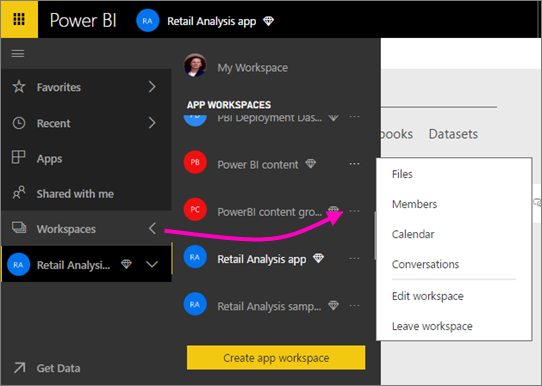
When I go to this page in the online docs, it shows this context menu:
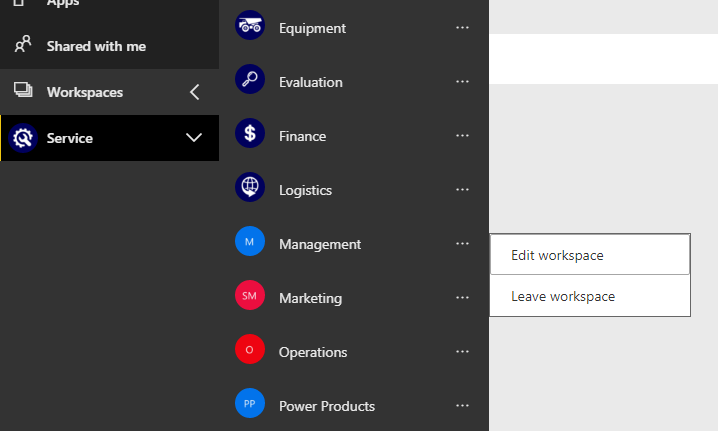
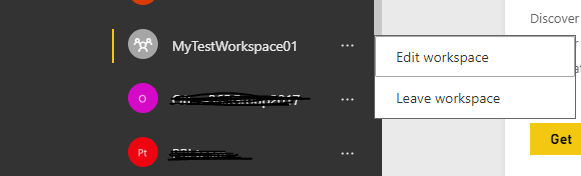
I only have this menu however - it's missing the top 4 options.
I created all of these workspaces and I'm the sole admin of them. I also have the following Office 365 roles
Anyone got any ideas?
Thanks in advance 🙂
Hi @laserkiwi,
A new created App Workspace will only show two options as you mentioned above: "Edit Workspace" and "Leave Workspace". Please wait for a while, all other 4 options will be available.
Once created.
After about 20 minutes later.
Best regards,
Yuliana Gu
Hi Yuliana
It's been about 2 months since I created them - I just then turned my attention to developing reports in Desktop, so I haven't been concentrating on setting them up properly until now.
Hi @laserkiwi,
For this problem, I would suggest you create a support ticket for further analysis.
Regards,
Yuliana Gu
The Power BI Data Visualization World Championships is back! Get ahead of the game and start preparing now!
| User | Count |
|---|---|
| 56 | |
| 55 | |
| 31 | |
| 18 | |
| 14 |